
Reviews
Your graphics add a nice touch to my presentations and I recently used them for one of my all-hands meetings. Your toolbox adds professionalism to my slides. Instead of using standard clipart.
I needed a fresh look at some of my slides. I've tried to find a way to create a paintbrush effect, to underline, accentuate, add some color and the handwritten markers were just the things. Very easy to use, easy to size, change the color. It was an affordable, perfect solution and I'm happy to recommend it.
The crisp, clean look of the graphics, and the fact that it allowed me to easily edit and change the colors to match the template was my main reason for purchasing them.
Description
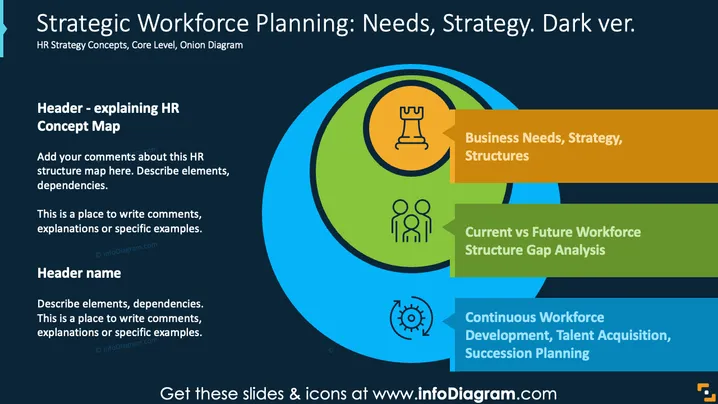
Strategic Workforce Planning: Needs, Strategy. Dark ver.
Slide Content
The slide delves into HR strategy concepts, focusing on three key aspects: "Business Needs, Strategy, Structures" which emphasizes aligning workforce planning with organizational goals; "Current vs Future Workforce Structure Gap Analysis" addressing the comparison between existing and required workforce arrangements; and "Continuous Workforce Development, Talent Acquisition, Succession Planning" underscoring ongoing processes to meet future workforce demands efficiently.
Graphical Look
- The slide has a dark background, providing a strong visual contrast.
- A circular "onion diagram" in blue, green, and orange highlights key points.
- Icons accompany each section: a rook icon for strategy, people icon for workforce, and a cyclical arrows icon for development.
- Text boxes in orange, green, and blue provide clarity and separation of each concept.
The slide employs a clean and professional layout with a focus on strategic visual elements, using color-coded segments to effectively delineate complex concepts.
Use Cases
- HR strategy presentations for organizational leadership.
- Workshops on workforce planning and development.
- Meetings focusing on talent management and succession planning.
- Strategic planning sessions for aligning business needs with workforce capabilities.
How to Edit
How to edit text & colors

How to expand / shorten diagram

How to Replace Icons in infoDiagram PPT


