
Reviews
Sus gráficos añaden un toque agradable a mis presentaciones y recientemente los usé para una de mis reuniones generales. Su conjunto de herramientas añade profesionalismo a mis diapositivas. En lugar de usar imágenes prediseñadas estándar.
Necesitaba un aspecto fresco para algunas de mis diapositivas. Había intentado encontrar una forma de crear un efecto de pincel, de subrayar, acentuar, añadir algo de color y los marcadores escritos a mano fueron justo lo que necesitaba. Muy fácil de usar, fácil de ajustar el tamaño, cambiar el color. Fue una solución asequible y perfecta, y estoy feliz de recomendarla.
El aspecto nítido y limpio de los gráficos, y el hecho de que me permitiera editar y cambiar fácilmente los colores para que coincidieran con la plantilla fue mi principal razón para comprarlos.
Description
Story Points
Slide Content
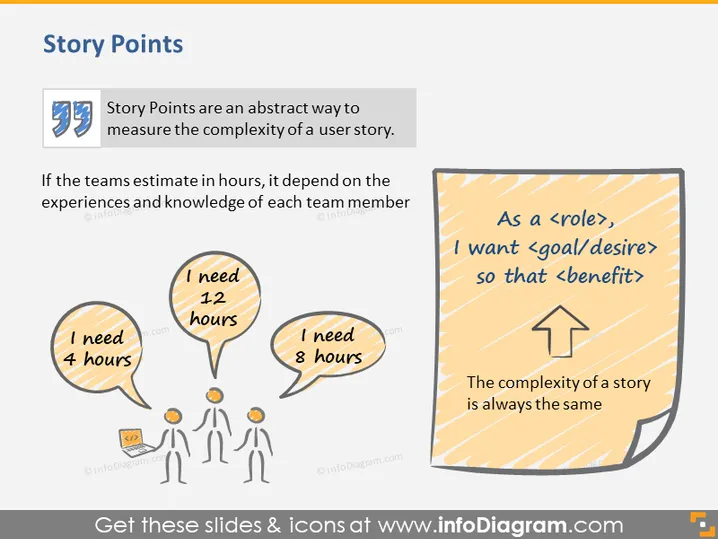
Story Points are presented as an abstract means to gauge the complexity of a user story, contrasting it with hour-based estimates that vary depending on individual team members' expertise and experience. The slide visually demonstrates this concept using speech bubbles with differing hour requirements linked to caricatures of people, alongside a yellow sticky note explaining the consistent complexity of a story with the template, "As a <role>, I want <goal/desire> so that <benefit>."
Graphical Look
- The slide background is plain white.
- A large heading labeled "Story Points" is at the top of the slide.
- Two blocks of text are present: one is a quote in a light blue box with a quotation mark icon, and the other is a stylized yellow sticky note on the right.
- Three speech bubbles contain text indicating disparate hour requirements for a task ("I need 4 hours," "I need 1-2 hours," and "I need 8 hours").
- Cartoon-style figures are placed below these speech bubbles, corresponding to the stated hour requirements.
- A large arrow is ascending from the bottom to the top within the sticky note, indicating direction or improvement.
The slide has a clean and simplistic design with colorful and illustrative icons that visually reinforce the textual content.
Use Cases
- Explaining the concept of story points in an Agile methodology training or workshop.
- Demonstrating the variability of task estimation during team retrospectives or planning meetings.
- Clarifying the advantages of abstract estimation techniques over concrete time-based estimates in project management presentations.
- Introducing new team members to the practices of user story creation and estimation in software development projects.
How to Edit
How to edit text & colors

How to expand / shorten diagram

How to Replace Icons in infoDiagram PPT


