
Reviews
Your graphics add a nice touch to my presentations and I recently used them for one of my all-hands meetings. Your toolbox adds professionalism to my slides. Instead of using standard clipart.
I needed a fresh look at some of my slides. I've tried to find a way to create a paintbrush effect, to underline, accentuate, add some color and the handwritten markers were just the things. Very easy to use, easy to size, change the color. It was an affordable, perfect solution and I'm happy to recommend it.
The crisp, clean look of the graphics, and the fact that it allowed me to easily edit and change the colors to match the template was my main reason for purchasing them.
Description
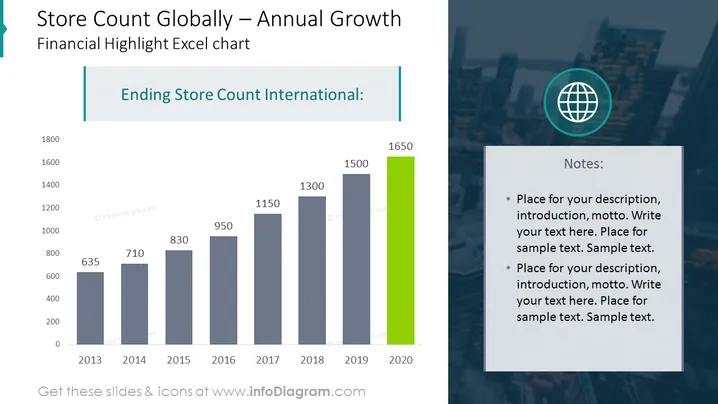
Store Count Globally – Annual Growth
Slide Content
The slide is titled "Store Count Globally – Annual Growth" and presents a vertical bar chart tracking the annual growth of a company's store count from 2013 to 2020. The chart shows a positive trend with numbers rising from 635 in 2013 to 1650 in 2020. The year 2020 is highlighted with a green bar, suggesting particular emphasis on the most recent data. A note section suggests placeholders for additional descriptions or commentary related to the chart.
Graphical Look
- A large title in bold, dark teal text at the top of the slide, set against a light background.
- A vertical bar chart with bars in various shades of blue representing years from 2013 to 2019 and a green bar for 2020, each labeled with the corresponding store count.
- A globe icon within a light blue circle to the right of the chart, indicating a global perspective.
- A rectangle containing text to the right of the chart, with the heading 'Notes:' followed by bulleted placeholder text.
- Use of soft shadows beneath the bars on the chart to give a slight 3D effect.
The slide has a clean, professional appearance with a contrasting color scheme that highlights the most recent data. The simple layout allows for easy interpretation of the chart and the notes section provides space for additional context or information.
Use Cases
- Presenting annual growth metrics during corporate financial meetings or investor briefings.
- Explaining strategic expansion plans with a visual representation of growth in a marketing or sales presentation.
- Demonstrating company performance over time to stakeholders in annual reports or shareholders meetings.
- Comparing store count progression against competitors or industry benchmarks in business strategy sessions or consultations.
How to Edit
How to edit text & colors

How to expand / shorten diagram

How to Replace Icons in infoDiagram PPT


