
Reviews
Your slides are my "secret sauce" when it comes to presenting my ideas to clients. I save a lot of time.
J'avais un délai de livraison à respecter et je n'avais pas le temps de créer une variété de modèles de diapositives. Infodiagram m'a proposé des options faciles à télécharger et à personnaliser en fonction de mes besoins !
Vos diapositives suscitent souvent de précieux commentaires et idées de la part de mon équipe, ce qui améliore les diapositives finales.
Description
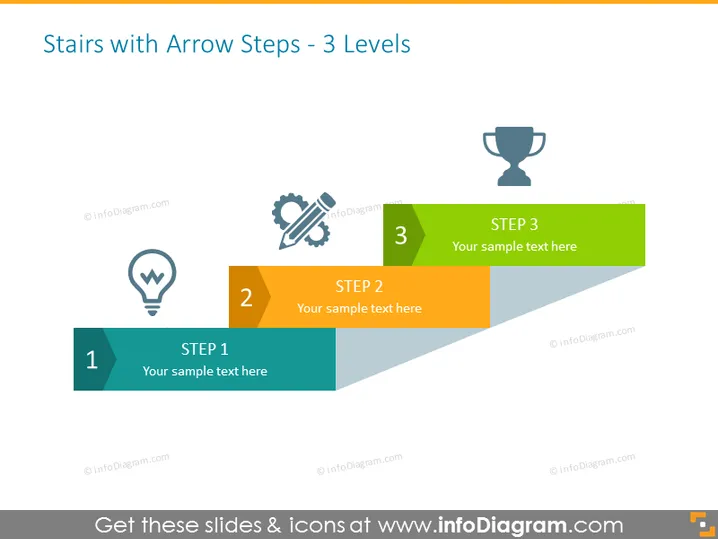
Stairs with Arrow Steps - 3 Levels
Slide Content
The slide is designed to represent a three-step process using arrow-shaped steps, indicating progression. Each step is marked with a number and has placeholders for custom text. Step 1 is associated with an icon of a lightbulb, suggesting an idea or initiation phase. Step 2 is paired with gear and pencil icons, possibly denoting a development or planning stage. Step 3 is capped with a trophy icon, which may symbolize the achievement or end goal of the process.
Graphical Look
- The slide features a staircase consisting of three arrow-shaped steps ascending from left to right.
- Each step has a distinct color—teal for Step 1, orange for Step 2, and green for Step 3.
- Icons are placed on the left side of each step—lightbulb for Step 1, gears and pencil representing work or planning for Step 2, and a trophy for Step 3.
- The steps are labeled with large bold numbers and titled "STEP" followed by placeholders for custom text.
- Drop shadows are visible beneath each step, adding depth to the graphic.
- The arrow shapes suggest forward motion and progression.
This PowerPoint slide is clean and visually appealing, using a simple color scheme and distinct icons to effectively communicate a process or progression. The arrow steps provide a sense of advancement and achievement.
Use Cases
- Presenting a business process or project plan in a clear, linear fashion.
- Illustrating key milestones or phases in a product development lifecycle.
- Demonstrating steps in an organizational change or improvement strategy.
- Using as an agenda slide to outline the main points of a presentation.
How to Edit
How to edit text & colors

How to expand / shorten diagram

How to Replace Icons in infoDiagram PPT


