Status Indicators – Outline Icons for Flat Tables
Slide Content
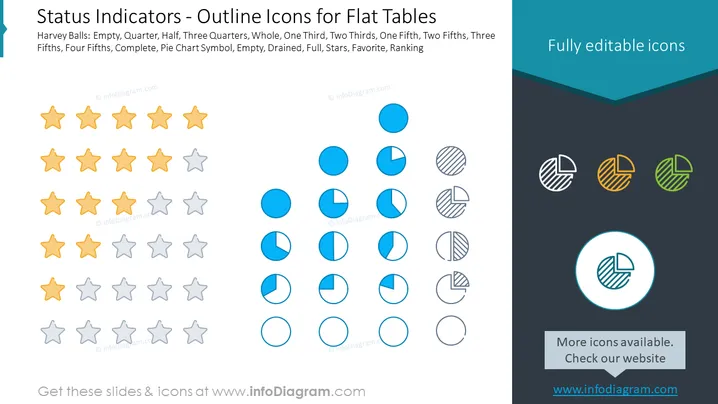
The slide provides a visual representation of various status indicators using iconography, primarily used for showing progress or completion levels in flat table formats. The icons include Harvey Balls at various fill stages – Empty, Quarter, Half, Three Quarters, Whole, One Third, Two Thirds, One Fifth, Two Fifths, Three Fifths, Four Fifths, Complete – and additionally a pie chart symbol with variations of filling, with descriptors such as Empty, Drained, Full, Stars, Favorite, Ranking. These icons can communicate different states of project phases or performance levels, ranging from not started (empty) to fully complete (whole or full).
Graphical Look
- The slide background is white, with a dark title bar across the top.
- The title text "Status Indicators – Outline Icons for Flat Tables" is displayed in the title bar.
- Below the title, there are three rows of icons categorized under Harvey Balls, Solid Circles, and Pie Charts.
- Each icon is accompanied by a textual description of its filling state, such as Empty, Quarter, Half, Three Quarters, etc.
- The icons are in shades of yellow, blue, and grey, with additional pie chart icons displayed in a range of fill patterns and colors on the right.
- The colors used highlight the differences in the status levels represented by the icons, ranging from no fill (empty) to full fill (complete).
- A circle highlights one pie chart icon, drawing attention to it, and a caption beneath it reads "More icons available. Check our website."
The slide displays a simplistic yet efficient design, using visual elements that convey data statuses through easily interpretable icons. The various icons employ color contrasts and fill patterns effectively to represent the amount of completion or status.
Use Cases
- To present project progress by illustrating various stages of completion for tasks within a project timeline.
- In dashboards that require visual representation ## Status Indicators – Outline Icons for Flat Tables
Slide Content
The slide titled "Status Indicators – Outline Icons for Flat Tables" showcases a variety of graphical icons that can be used to indicate different status levels within tables. There are three categories presented: Harvey Balls, solid circles, and pie charts, with each category featuring different fill levels such as empty, quarter, half, three-quarters, and full. The Slide Content header explains that these images can represent various proportions like one third, two thirds, one fifth, two fifths, three fifths, four fifths, as well as symbols indicating completion, preference or ranking such as pie chart symbol, empty, drained, full, stars, favorite, and ranking. These visual elements simplify the communication of progress, quality or satisfaction levels.
Graphical Look
- The slide features a large dark teal title bar at the top with white text for the title.
- Three distinct sections of icons are displayed in rows: Harvey Balls, Solid Circles, and Pie Charts.
- Harvey Balls are shown in two shades of yellow (full and empty) and grey (various fill levels).
- Solid Circles appear in a shade of blue, depicting various fill levels from empty to full.
- Pie Chart icons include various patterns and a small palette of colors, located to the right.
- Each set of icons is labeled with descriptive text below, specifying the amount each icon is filled.
- The icons are sized consistently and aligned in a grid layout that is symmetrical, ensuring easy visual comparison.
- An additional notation below a highlighted pie chart icon at the bottom right prompts users to check the website for more icons.
The slide is designed to be clean and structured, with a harmonious balance of text and visual elements. Color coding is used strategically to differentiate between the types of indicators, aiding in quick visual recognition.
Use Cases
- Utilized in business reports to visually represent metrics such as customer satisfaction levels or product feature completeness - In project management presentations to communicate the status of various initiatives or milestones using an intuitive visual method.
- For educational materials to help explain data visualization techniques involving qualitative measures.
- During team meetings to quickly convey the progress of various tasks or objectives in a visually engaging way.