

Your graphics add a nice touch to my presentations and I recently used them for one of my all-hands meetings. Your toolbox adds professionalism to my slides. Instead of using standard clipart.
Claude Jones, Director of Engineer, @Walmartlabs, USA

Your graphics add a nice touch to my presentations and I recently used them for one of my all-hands meetings. Your toolbox adds professionalism to my slides. Instead of using standard clipart.
Claude Jones, Director of Engineer, @Walmartlabs, USA
I needed a fresh look at some of my slides. I've tried to find a way to create a paintbrush effect, to underline, accentuate, add some color and the handwritten markers were just the things. Very easy to use, easy to size, change the color. It was an affordable, perfect solution and I'm happy to recommend it.
Anonymous, US
The crisp, clean look of the graphics, and the fact that it allowed me to easily edit and change the colors to match the template was my main reason for purchasing them.
Brandie Jenkins, E-learning Developer, USA
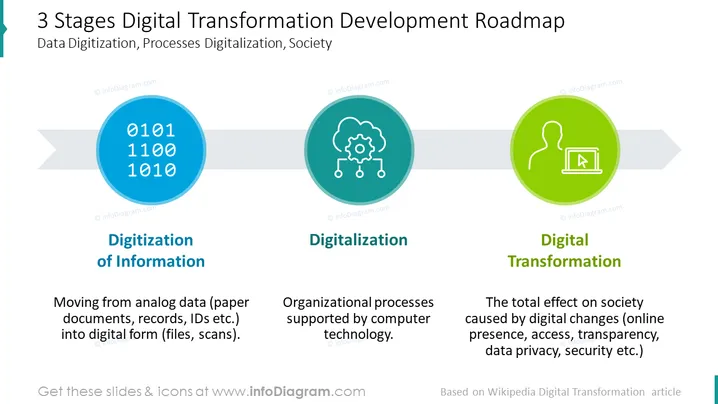
This slide shows a DT roadmap. Using a roadmap helps to visualize your digital transformation journey or plan. Build a digital transformation roadmap for things like steps for adoption, your new digital transformation initiative, illustrates a transformation plan for moving into a digital ecosystem, present to stakeholders, present what a successful digital transformation looks like, what digital capabilities for business leaders or even entire teams look like, integrate innovative and new technologies into, - or to upgrade - existing processes, prioritize your customer expectations, the effect of digital technologies on things like organizational effectiveness, effects on senior management and similar topics, automate certain processes and get real-time data, etc. All elements are fully editable, with icons coming in a vector graphic format. You can add your own text or data (e.g. RoI, text on measurable targets or business goals, your company's digital strategy, digitalization & automation, etc.) Our roadmaps are compatible with PowerPoint, Keynote, and Google Slides.
##Template slide contents: Digital Transformation Roadmap PPT, Vector Graphic Illustrations, DT Development Roadmap (3 Stages), Textboxes, Placeholder Text, Bits (1s & 0s) Icon, Cloud Technology Icon, Person & Computer Icon, Arrow Graphic, Resizable Shapes, White Background



