
Reviews
Sus gráficos añaden un toque agradable a mis presentaciones y recientemente los usé para una de mis reuniones generales. Su conjunto de herramientas añade profesionalismo a mis diapositivas. En lugar de usar imágenes prediseñadas estándar.
Necesitaba un aspecto fresco para algunas de mis diapositivas. Había intentado encontrar una forma de crear un efecto de pincel, de subrayar, acentuar, añadir algo de color y los marcadores escritos a mano fueron justo lo que necesitaba. Muy fácil de usar, fácil de ajustar el tamaño, cambiar el color. Fue una solución asequible y perfecta, y estoy feliz de recomendarla.
El aspecto nítido y limpio de los gráficos, y el hecho de que me permitiera editar y cambiar fácilmente los colores para que coincidieran con la plantilla fue mi principal razón para comprarlos.
Description
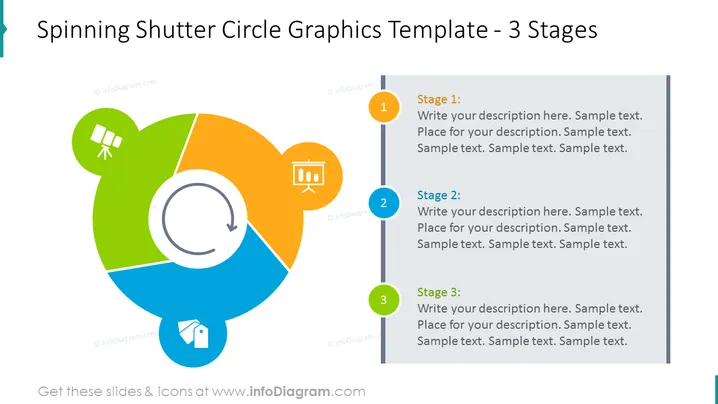
Spinning Shutter Circle Graphics Template - 3 Stages
Slide Content
The slide presents a 3-stage process described within a circular diagram designed to resemble a spinning shutter. Each stage is denoted by a numbered circle connected to a rectangular box containing placeholder text for a description. Stage 1 encompasses a green segment with a satellite icon, indicating an outward or expansive action, perhaps related to communication or reach. Stage 2 is colored orange and contains a presentation icon, which may signify the delivery or explanation of concepts. Stage 3, in blue, features a home icon, possibly representing an end, return, or conclusion of the cycle.
Graphical Look
- A large circular graphic divided into three colored segments (green, orange, and blue) symbolizing different stages.
- A curved arrow in the center of the circle, depicting rotation or cyclic motion.
- Three numbered circles (1-3) on the left, each correlating with a corresponding segment of the large circle.
- Rectangular text boxes to the right of each numbered circle with placeholder headings "Stage 1", "Stage 2", and "Stage 3," and space for additional descriptions.
- Icons within each colored segment related to the stage: a satellite for green, a presentation board for orange, and a home symbol for blue.
The slide has a clean and modern design with a balance between graphical elements and text. The color usage is vibrant, enhancing the visual separation of different stages, and the central rotating arrow effectively conveys a sense of progression or a cyclical process.
Use Cases
- Illustrating a project or business concept that has a three-phase cycle.
- Describing the stages of a marketing or sales funnel in a visual and engaging manner.
- Outlining the steps of a product development process from inception to market entry.
- Explaining the continuous improvement cycle in quality management or operational processes.
How to Edit
How to edit text & colors

How to expand / shorten diagram

How to Replace Icons in infoDiagram PPT


