
Your graphics add a nice touch to my presentations and I recently used them for one of my all-hands meetings. Your toolbox adds professionalism to my slides. Instead of using standard clipart.
Claude Jones, Director of Engineer, @Walmartlabs, USA
Your graphics add a nice touch to my presentations and I recently used them for one of my all-hands meetings. Your toolbox adds professionalism to my slides. Instead of using standard clipart.
Claude Jones, Director of Engineer, @Walmartlabs, USA
I needed a fresh look at some of my slides. I've tried to find a way to create a paintbrush effect, to underline, accentuate, add some color and the handwritten markers were just the things. Very easy to use, easy to size, change the color. It was an affordable, perfect solution and I'm happy to recommend it.
Anonymous, US
The crisp, clean look of the graphics, and the fact that it allowed me to easily edit and change the colors to match the template was my main reason for purchasing them.
Brandie Jenkins, E-learning Developer, USA
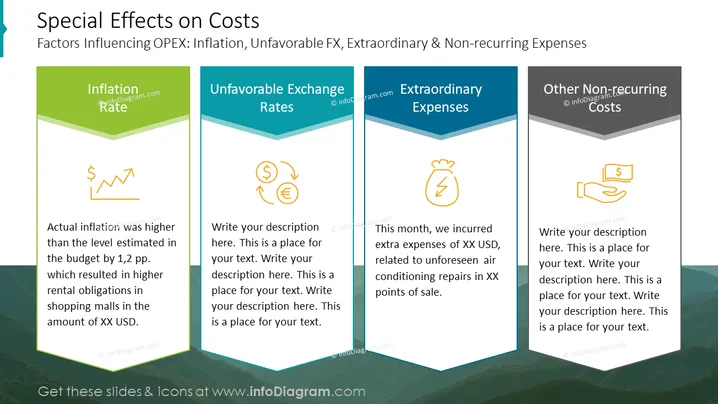
The PowerPoint slide provides a breakdown of various factors that affect Operational Expenditures (OPEX), namely inflation, unfavorable exchange rates, extraordinary expenses, and other non-recurring costs. Each category is highlighted with an icon: inflation has an upward-pointing arrow with a dollar sign implying rising costs, unfavorable exchange rates feature currency symbols suggesting financial loss due to currency fluctuations, extraordinary expenses are represented by a lightning bolt indicating unforeseen or exceptional charges, and other non-recurring costs are denoted by a piggy bank, hinting at irregular or one-time financial outlays. There are placeholders for detailed text descriptions under each category, with only the "Inflation Rate" and "Extraordinary Expenses" sections containing example text, speaking to real-world budgetary impacts and specific unanticipated costs, respectively.
The slide utilizes a clean and modern design with visually distinct sections that allow easy interpretation and allocation of specific content. The icons provide a quick reference to the subject matter of each section.




