
Reviews
Sus gráficos añaden un toque agradable a mis presentaciones y recientemente los usé para una de mis reuniones generales. Su conjunto de herramientas añade profesionalismo a mis diapositivas. En lugar de usar imágenes prediseñadas estándar.
Necesitaba un aspecto fresco para algunas de mis diapositivas. Había intentado encontrar una forma de crear un efecto de pincel, de subrayar, acentuar, añadir algo de color y los marcadores escritos a mano fueron justo lo que necesitaba. Muy fácil de usar, fácil de ajustar el tamaño, cambiar el color. Fue una solución asequible y perfecta, y estoy feliz de recomendarla.
El aspecto nítido y limpio de los gráficos, y el hecho de que me permitiera editar y cambiar fácilmente los colores para que coincidieran con la plantilla fue mi principal razón para comprarlos.
Description
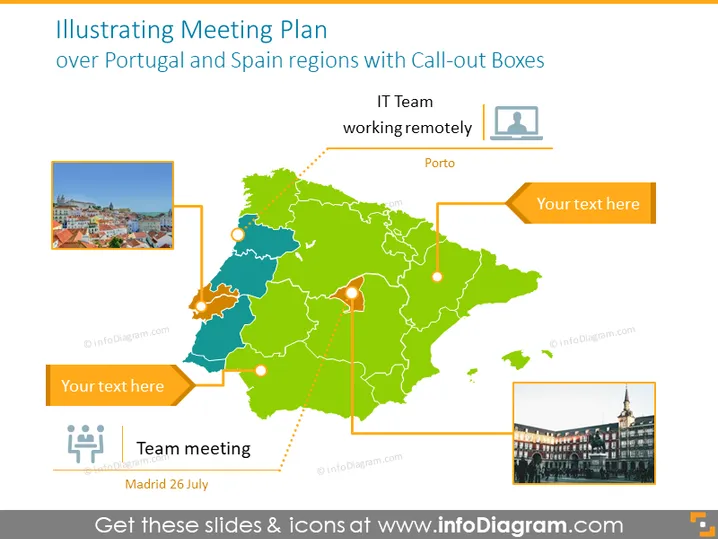
Illustrating Meeting Plan
Slide Content
The slide titled "Illustrating Meeting Plan" appears to be focused on portraying a meeting schedule across regions in Portugal and Spain using call-out boxes. It features labeled call-out boxes indicating a remote IT team in Porto, space for additional text, and a team meeting scheduled in Madrid on the 26th of July. Each call-out box is connected to a specific location on a stylized map of the Iberian Peninsula, signifying precise targeting of information dissemination or event coordination.
Graphical Look
- A stylized political map of the Iberian Peninsula occupies the central portion of the slide, vivid in green and blue tones to demarcate different regions or countries.
- Orange call-out boxes with a drop shadow effect are connected to the map by dotted lines, one pointing to Porto and one to an undefined location, each containing placeholder text "Your text here."
- Two images are superimposed on the map, each within a border and drop shadow--one depicting a cityscape presumably of Porto, and another one presenting a landmark presumably in Madrid.
- An icon with two figures and a gear, representing a team meeting, is located in a rectangular box with a placeholder for additional text, along with the indicated date of "Madrid 26 July."
- The icon of a person inside a square, indicating remote work, is aligned with the call-out pointing to Porto.
The overall look is clean and business-oriented, with a clear visual hierarchy that uses connectors, contrasting colors, and icons to guide the viewer through the information. The use of photographs lends an authentic touch to the designated locations.
Use Cases
- To visually outline the locations and schedules for a series of business meetings or corporate events.
- For project management presentations highlighting different teams and their respective working locations.
- In strategic planning sessions when mapping out the regional distribution of resources or activities.
- As a part of travel itineraries in a corporate travel arrangement or team retreat planning document indicating specific destinations and dates.
How to Edit
How to edit text & colors

How to expand / shorten diagram

How to Replace Icons in infoDiagram PPT


