
Reviews
Ihre Grafiken verleihen meinen Präsentationen eine nette Note, und ich habe sie kürzlich für eines meiner All-Hands-Meetings verwendet. Ihre Toolbox verleiht meinen Folien Professionalität, anstatt Standard-Clipart zu verwenden.
Ich brauchte einen neuen Blick auf einige meiner Folien. Ich habe versucht, einen Weg zu finden, einen Pinselschlag-Effekt zu erzielen, um zu unterstreichen, hervorzuheben, Farbe hinzuzufügen, und die handgeschriebenen Markierungen waren genau das Richtige. Sehr einfach zu bedienen, leicht in der Größe zu ändern, die Farbe zu ändern. Es war eine erschwingliche, perfekte Lösung und ich empfehle sie gerne weiter.
Die klare, saubere Optik der Grafiken und die Tatsache, dass ich die Farben leicht bearbeiten und an die Vorlage anpassen konnte, war mein Hauptgrund für den Kauf.
Description
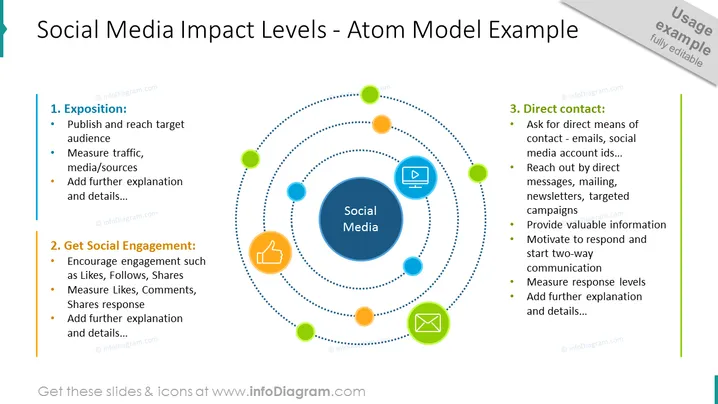
##Social Media Impact Levels: Atom Model Example Slide
Discuss the social media impact levels with an explanatory atom model illustration. Place representations of media platforms on the atom's orbit represented with colorful particles and icons. Add your descriptions and adjust the colors of the graphics if needed in just a few minutes.
##What Does This Social Media Impact Levels: Atom Model Example Slide Include?
- Illustration of atom orbits with colorful particles containing icons
- Central circular graphic containing the title of the illustration
- 3 editable text placeholders with titles for your descriptions
- Outline icons of a thumb up, approval,
This Social Media Impact Levels: Atom Model Example Slide is a part of our Atom Orbiting Elements Infographics PPT Template.
How to Edit
How to edit text & colors

How to expand / shorten diagram

How to Replace Icons in infoDiagram PPT


