
Reviews
Ihre Grafiken verleihen meinen Präsentationen eine nette Note, und ich habe sie kürzlich für eines meiner All-Hands-Meetings verwendet. Ihre Toolbox verleiht meinen Folien Professionalität, anstatt Standard-Clipart zu verwenden.
Ich brauchte einen neuen Blick auf einige meiner Folien. Ich habe versucht, einen Weg zu finden, einen Pinselschlag-Effekt zu erzielen, um zu unterstreichen, hervorzuheben, Farbe hinzuzufügen, und die handgeschriebenen Markierungen waren genau das Richtige. Sehr einfach zu bedienen, leicht in der Größe zu ändern, die Farbe zu ändern. Es war eine erschwingliche, perfekte Lösung und ich empfehle sie gerne weiter.
Die klare, saubere Optik der Grafiken und die Tatsache, dass ich die Farben leicht bearbeiten und an die Vorlage anpassen konnte, war mein Hauptgrund für den Kauf.
Description
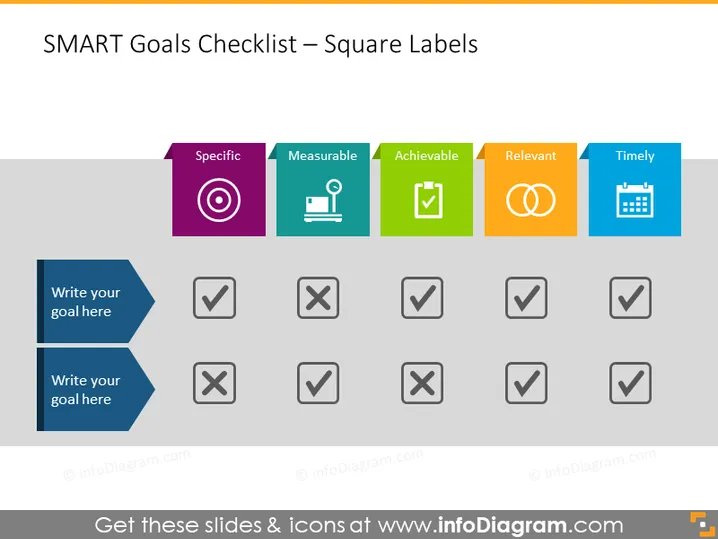
SMART Goals Checklist – Square Labels
Slide Content
This PowerPoint slide outlines a SMART Goals Checklist with criteria such as Specific, Measurable, Achievable, Relevant, and Timely. Each criterion is represented by a colorful square label with an icon, paired with a row of checkboxes. Specific refers to well-defined and clear objectives. Measurable signifies the ability to track progress quantitatively. Achievable denotes the possibility of accomplishing the goal. Relevant means the goal aligns with broader objectives, and Timely implies a defined time frame for completion. Two blank fields prompt the user to write their own goals and assess them against the SMART criteria.
Graphical Look
- The slide has a clean, modern look with a white background and a simple, structured layout.
- Five color-coded square labels representing the SMART criteria are aligned horizontally at the top with corresponding icons: a target for Specific, a gauge for Measurable, a checkmark for Achievable, intertwined circles for Relevant, and a calendar for Timely.
- Below the labels, there are two rows of checkboxes, each consisting of five gray squares with a check (✓) or a cross (✗) symbol indicating whether each goal aspect is met.
- Two blue arrow-shaped labels on the left side provide spaces to "Write your goal here."
The slide uses sharp geometric shapes and contrasting colors for clarity and visual impact. Each element is designed to guide the viewer through evaluating and checking off essential aspects of goal setting.
Use Cases
- During a strategic planning meeting, to structure goal-setting and ensure all aspects of SMART criteria are considered.
- In a personal development session, to help individuals define clear and achievable personal or professional goals.
- During a project kickoff, to align the team's objectives and ensure they are measurable and time-bound.
- Within management training or workshops, to teach the importance of setting effective and well-structured goals.
How to Edit
How to edit text & colors

How to expand / shorten diagram

How to Replace Icons in infoDiagram PPT


