
Reviews
Your graphics add a nice touch to my presentations and I recently used them for one of my all-hands meetings. Your toolbox adds professionalism to my slides. Instead of using standard clipart.
I needed a fresh look at some of my slides. I've tried to find a way to create a paintbrush effect, to underline, accentuate, add some color and the handwritten markers were just the things. Very easy to use, easy to size, change the color. It was an affordable, perfect solution and I'm happy to recommend it.
The crisp, clean look of the graphics, and the fact that it allowed me to easily edit and change the colors to match the template was my main reason for purchasing them.
Description
Sensitivity Analysis Template
Slide Content
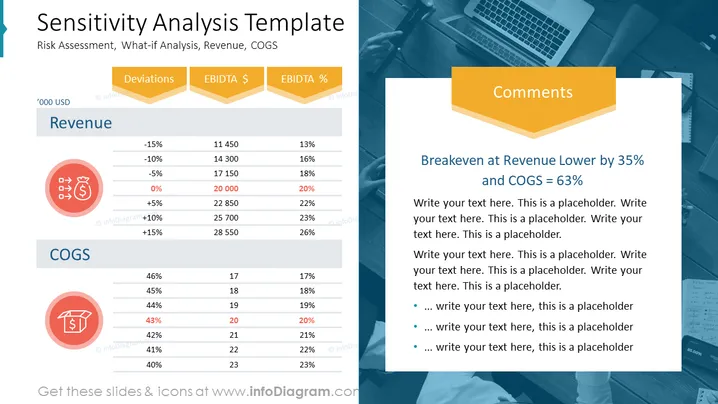
The slide titled "Sensitivity Analysis Template" discusses risk assessment and what-if analysis, focusing on revenue and COGS (Cost of Goods Sold). It features two main sections of data: "Revenue" with potential deviations from -15% to +15% and the corresponding EBITDA ($) and EBITDA (%) for each deviation; "COGS" with percentages from 40% to 46% and the associated values in '000 USD. Below each section, there are illustrative icons. A "Comments" section outlines a specific scenario, breakeven at Revenue Lower by 35% and COGS of 63%.
Graphical Look
- The slide background is a gradient of light blue and white, giving a clean, modern feel.
- The left side contains two sets of data in a table format, one labeled "Revenue" and the other "COGS".
- Each table includes rows of percentages and corresponding financial figures.
- The "Revenue" and "COGS" sections each have a red icon, a bag of money and a calculator respectively, signifying financial elements.
- At the top, there's a ribbon-like graphic in orange with labels "Deviations," "EBIDTA $," and "EBIDTA %," following the theme of financial analysis.
- On the right, a larger orange rectangle labeled "Comments" contains a highlighted statement, followed by bullet points for additional text.
- A laptop and other subtle workplace-related graphics overlay the background on the right.
- Grey horizontal lines separate the different rows in the tables, and there are focus points with a blue fill color emphasizing a specific value in each table.
The slide has a professional and streamlined design with a clear focus on financial data. The use of icons and color highlights draws attention to key elements without overwhelming the viewer.
Use Cases
- To present a financial risk analysis during a business strategy meeting, highlighting the impact of changing revenues or costs.
- In a management or stakeholder presentation to discuss potential outcomes of market fluctuations on financial performance.
- Within a financial planning and analysis (FP&A) session to evaluate the sensitivity of profit margins to different cost structures.
- As part of an investment pitch to demonstrate the financial robustness of a business model under various scenarios.
How to Edit
How to edit text & colors

How to expand / shorten diagram

How to Replace Icons in infoDiagram PPT


