
Reviews
Ihre Grafiken verleihen meinen Präsentationen eine nette Note, und ich habe sie kürzlich für eines meiner All-Hands-Meetings verwendet. Ihre Toolbox verleiht meinen Folien Professionalität, anstatt Standard-Clipart zu verwenden.
Ich brauchte einen neuen Blick auf einige meiner Folien. Ich habe versucht, einen Weg zu finden, einen Pinselschlag-Effekt zu erzielen, um zu unterstreichen, hervorzuheben, Farbe hinzuzufügen, und die handgeschriebenen Markierungen waren genau das Richtige. Sehr einfach zu bedienen, leicht in der Größe zu ändern, die Farbe zu ändern. Es war eine erschwingliche, perfekte Lösung und ich empfehle sie gerne weiter.
Die klare, saubere Optik der Grafiken und die Tatsache, dass ich die Farben leicht bearbeiten und an die Vorlage anpassen konnte, war mein Hauptgrund für den Kauf.
Description
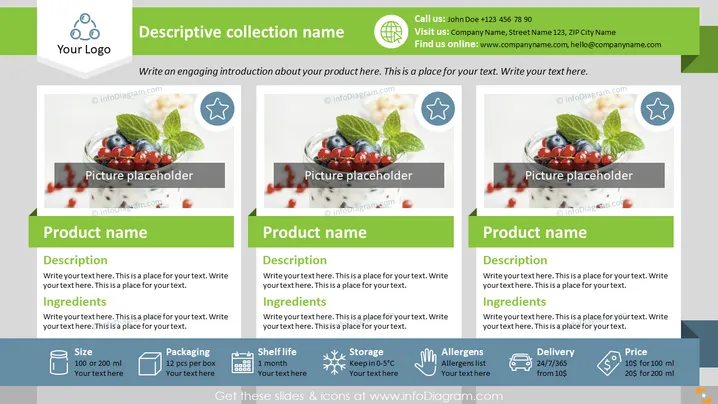
Sell Sheet for Food Products Collection
Slide Content:
The PowerPoint slide appears to be part of a product catalog or collection presentation, showcasing individual food products. Each product section includes a "Product name" with a "Description" and "Ingredients" listed beneath, which would detail the product's features and contents. Icons for "Size," "Packaging," "Shelf life," "Storage," "Allergens," "Delivery," and "Price" provide practical information. These icons indicate the product's volume options, packaging type, how long it lasts, storage requirements, potential allergens, delivery terms, and cost, respectively—key details for retailers or consumers considering the product.
Graphical Look:
- Three columns, each with a "Product name" title in a bold green bar.
- Text placeholders for product descriptions and lists of ingredients.
- A central picture placeholder in each column, with an image of berries and mint.
- Iconography corresponding to product specifications like size and storage.
- A uniform color palette of green, gray, and white across all elements.
- Star icons on the picture placeholders, suggesting featured or recommended items.
The slide is designed with a clean, organized layout, using visual elements like icons and images to create an engaging overview of products. The color scheme is professional and unobtrusive, making the information easily accessible.
Use Cases:
- Trade show presentations to highlight product features to potential buyers.
- Marketing meetings to discuss product range with sales teams.
- Product training for new employees to familiarize them with the product line.
- Retailer pitches to introduce product collections and their specifics.
How to Edit
How to edit text & colors

How to expand / shorten diagram

How to Replace Icons in infoDiagram PPT


