

Your graphics add a nice touch to my presentations and I recently used them for one of my all-hands meetings. Your toolbox adds professionalism to my slides. Instead of using standard clipart.
Claude Jones, Director of Engineer, @Walmartlabs, USA

Your graphics add a nice touch to my presentations and I recently used them for one of my all-hands meetings. Your toolbox adds professionalism to my slides. Instead of using standard clipart.
Claude Jones, Director of Engineer, @Walmartlabs, USA
I needed a fresh look at some of my slides. I've tried to find a way to create a paintbrush effect, to underline, accentuate, add some color and the handwritten markers were just the things. Very easy to use, easy to size, change the color. It was an affordable, perfect solution and I'm happy to recommend it.
Anonymous, US
The crisp, clean look of the graphics, and the fact that it allowed me to easily edit and change the colors to match the template was my main reason for purchasing them.
Brandie Jenkins, E-learning Developer, USA
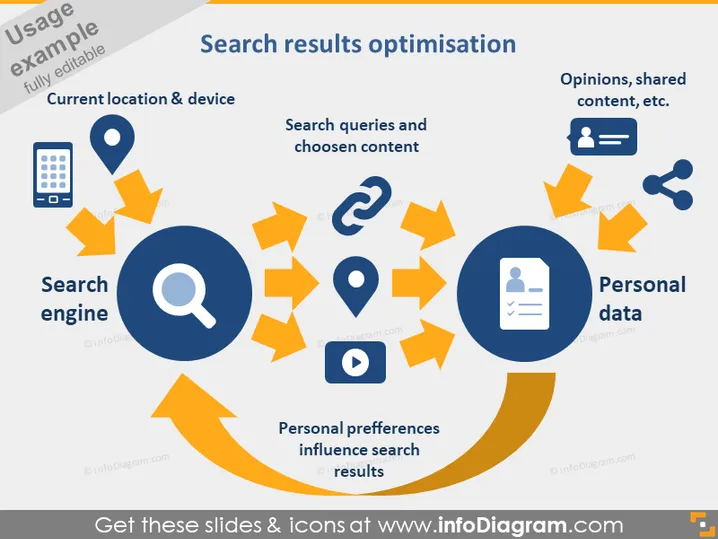
The PowerPoint slide titled "Search results optimisation" presents the dynamics of search engine personalization. "Current location & device" suggests that these factors affect personalized search results. "Search queries and choosen content" represents the users' input and engagement influencing the optimization process. "Personal preferences influence search results" indicates the customization of search outcomes based on individual user settings. "Personal data" encompasses factors like opinions and shared content which feed into further personalization. This diagram attempts to encapsulate the circular process behind customized search experiences.
The slide is dominated by a blue and orange color scheme, creating a clean and visually engaging layout. The use of icons and arrows effectively illustrates the interconnectivity and flow of information in search engine optimization.



