
Reviews
Sus gráficos añaden un toque agradable a mis presentaciones y recientemente los usé para una de mis reuniones generales. Su conjunto de herramientas añade profesionalismo a mis diapositivas. En lugar de usar imágenes prediseñadas estándar.
Necesitaba un aspecto fresco para algunas de mis diapositivas. Había intentado encontrar una forma de crear un efecto de pincel, de subrayar, acentuar, añadir algo de color y los marcadores escritos a mano fueron justo lo que necesitaba. Muy fácil de usar, fácil de ajustar el tamaño, cambiar el color. Fue una solución asequible y perfecta, y estoy feliz de recomendarla.
El aspecto nítido y limpio de los gráficos, y el hecho de que me permitiera editar y cambiar fácilmente los colores para que coincidieran con la plantilla fue mi principal razón para comprarlos.
Description
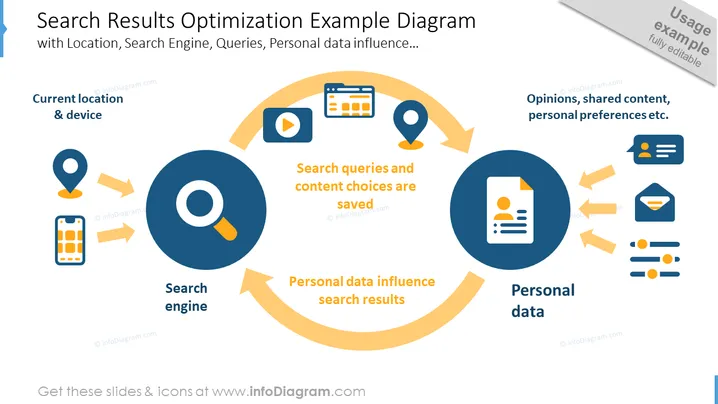
Search Results Optimization Example Diagram
Slide Content
The PowerPoint slide is titled "Search Results Optimization Example Diagram" and discusses how search results are personalized based on various factors such as location, search engine queries, and personal data. The slide visually represents a cycle showing how current location and device influence the search engine, which saves search queries and content choices. These saved choices then shape how personal data influences search results, completing a feedback loop that involves opinions, shared content, and personal preferences.
Graphical Look
- The slide background is white with a blue header section that contains the slide title.
- There are three main circular icons connected in a cyclical flow with thick, curved, yellow arrows.
- Each circular icon is paired with a related smaller icon representing concepts such as location, mobile device, search engine magnifying glass, text document, and personal data represented by user profiles.
- The color palette includes blue, dark blue, yellow, white, and grey for the icons and text.
- The slide has three key phrases in black bold text highlighting the interactions in the cycle: "Current location & device," "Search queries and content choices are saved," "Personal data influence search results."
- Text within each of the three sections is clear and concise, coordinating with the related icon.
The slide has a clean and modern design with a balanced composition of icons and texts to express a continuous cycle of actions and concepts.
Use Cases
- Explaining the concept of search engine optimization (SEO) to marketers and content creators to illustrate how various factors personalize search results.
- Training sessions on digital marketing, focusing on the importance of user data and behavior in influencing search engine rankings and results.
- Strategic meetings where website development or refinement are discussed, emphasizing the importance of user experience for better search performance.
- Presentations to clients to demonstrate how a company’s SEO strategy takes into account multiple dimensions of user behavior and preferences.
How to Edit
How to edit text & colors

How to expand / shorten diagram

How to Replace Icons in infoDiagram PPT


