

Your graphics add a nice touch to my presentations and I recently used them for one of my all-hands meetings. Your toolbox adds professionalism to my slides. Instead of using standard clipart.
Claude Jones, Director of Engineer, @Walmartlabs, USA

Your graphics add a nice touch to my presentations and I recently used them for one of my all-hands meetings. Your toolbox adds professionalism to my slides. Instead of using standard clipart.
Claude Jones, Director of Engineer, @Walmartlabs, USA
I needed a fresh look at some of my slides. I've tried to find a way to create a paintbrush effect, to underline, accentuate, add some color and the handwritten markers were just the things. Very easy to use, easy to size, change the color. It was an affordable, perfect solution and I'm happy to recommend it.
Anonymous, US
The crisp, clean look of the graphics, and the fact that it allowed me to easily edit and change the colors to match the template was my main reason for purchasing them.
Brandie Jenkins, E-learning Developer, USA
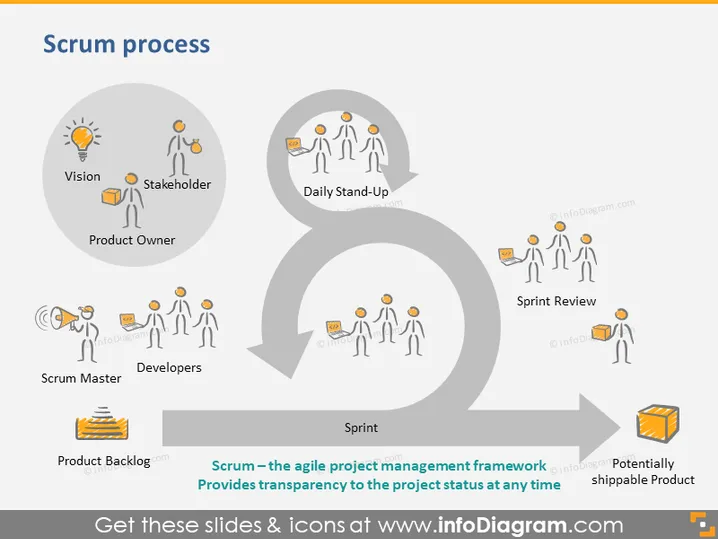
The slide illustrates the Scrum process, a framework for agile project management. It involves roles such as the Product Owner, who defines the vision and prioritizes the backlog; Stakeholders, who are interested parties; Scrum Master, who facilitates the process; and Developers, who execute tasks. Key activities shown include the Daily Stand-Up for synchronized team communication, Sprint Review to assess progress, and the Sprint itself, which is the core iterative cycle for development. The Scrum process aims to provide transparency to the project status at any time.
The overall look is clean and modern, using simple illustrations and icons to convey the Scrum process stages. The circular flowchart is central in design, effectively guiding the viewer's eye through the cycle of activities involved in Scrum.



