

Your graphics add a nice touch to my presentations and I recently used them for one of my all-hands meetings. Your toolbox adds professionalism to my slides. Instead of using standard clipart.
Claude Jones, Director of Engineer, @Walmartlabs, USA

Your graphics add a nice touch to my presentations and I recently used them for one of my all-hands meetings. Your toolbox adds professionalism to my slides. Instead of using standard clipart.
Claude Jones, Director of Engineer, @Walmartlabs, USA
I needed a fresh look at some of my slides. I've tried to find a way to create a paintbrush effect, to underline, accentuate, add some color and the handwritten markers were just the things. Very easy to use, easy to size, change the color. It was an affordable, perfect solution and I'm happy to recommend it.
Anonymous, US
The crisp, clean look of the graphics, and the fact that it allowed me to easily edit and change the colors to match the template was my main reason for purchasing them.
Brandie Jenkins, E-learning Developer, USA
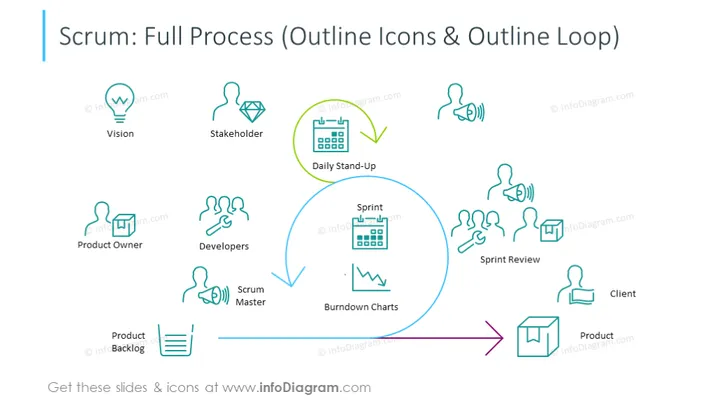
This slide provides a visual overview of the Scrum framework, highlighting key roles and activities in the agile methodology. The 'Vision' symbolizes the project's initial idea or goal. 'Stakeholder' represents individuals or groups with an interest in the project's success. The 'Product Owner' guides the development effort, representing the end-users' needs. 'Developers' are tasked with creating the product incrementally. The 'Scrum Master' facilitates the process, ensuring adherence to agile practices. 'Daily Stand-Up' meetings are quick check-ins for progress updates. The 'Sprint' is a time-boxed iteration for developing a product increment. 'Burndown Charts' visually track the work completed. The 'Sprint Review' assesses the increment developed. 'Product Backlog' is a list of tasks to be tackled. Finally, 'Client' and 'Product' denote the end-user and the resultant product, respectively.
The slide is designed with clarity and simplicity in mind, using a looped arrow to represent the cyclical nature of Scrum. The icons and color scheme work together to guide the viewer through the Scrum process in an orderly and aesthetically pleasing manner.



