
Reviews
Sus gráficos añaden un toque agradable a mis presentaciones y recientemente los usé para una de mis reuniones generales. Su conjunto de herramientas añade profesionalismo a mis diapositivas. En lugar de usar imágenes prediseñadas estándar.
Necesitaba un aspecto fresco para algunas de mis diapositivas. Había intentado encontrar una forma de crear un efecto de pincel, de subrayar, acentuar, añadir algo de color y los marcadores escritos a mano fueron justo lo que necesitaba. Muy fácil de usar, fácil de ajustar el tamaño, cambiar el color. Fue una solución asequible y perfecta, y estoy feliz de recomendarla.
El aspecto nítido y limpio de los gráficos, y el hecho de que me permitiera editar y cambiar fácilmente los colores para que coincidieran con la plantilla fue mi principal razón para comprarlos.
Description
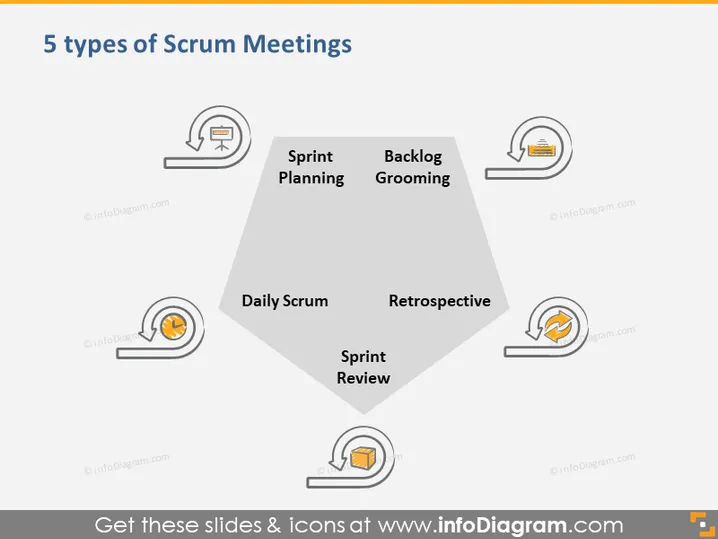
5 types of Scrum Meetings
Slide Content
This PowerPoint slide outlines the five essential types of meetings in Scrum, an agile framework for managing complex projects. Each meeting type is fundamental to the Scrum process: Sprint Planning is for defining what to complete during the sprint; Backlog Grooming involves refining and prioritizing backlog items; the Daily Scrum is a daily check-in to align the team; Sprint Review is held at the end of the sprint to review work; and the Retrospective focuses on improving the team's process.
Graphical Look
- The slide title is at the top using dark text.
- There's a large pentagon in the center with icons and text items surrounding it.
- Each corner of the pentagon points to a label paired with an icon representing a Scrum meeting:
- A clipboard for Sprint Planning, indicating organization and planning.
- A list for Backlog Grooming, signifying the process of refining the backlog.
- A clock for Daily Scrum, symbolizing time and regular check-ins.
- A chat bubble for Sprint Review, reflecting feedback and discussion.
- A looped arrow for Retrospective, denoting reflection and continuous improvement.
- The icons are gray with a pop of color, and each has a small shadow for a slight 3D effect.
- All five text items are written in bold and are evenly spaced around the central shape.
The overall look is clean and professional. The design uses simple graphics and a limited color palette to focus the viewer's attention on the concepts described.
Use Cases
- To educate team members on the key meetings within the Scrum framework during a training session.
- As part of an introduction for new hires to quickly understand the agile processes followed by the team.
- During a project kickoff meeting to align everyone's understanding of the Scrum process.
- To serve as a reminder for a team discussion on how to improve or focus on the meetings that are part of their agile practices.
How to Edit
How to edit text & colors

How to expand / shorten diagram

How to Replace Icons in infoDiagram PPT


