
Reviews
Ihre Grafiken verleihen meinen Präsentationen eine nette Note, und ich habe sie kürzlich für eines meiner All-Hands-Meetings verwendet. Ihre Toolbox verleiht meinen Folien Professionalität, anstatt Standard-Clipart zu verwenden.
Ich brauchte einen neuen Blick auf einige meiner Folien. Ich habe versucht, einen Weg zu finden, einen Pinselschlag-Effekt zu erzielen, um zu unterstreichen, hervorzuheben, Farbe hinzuzufügen, und die handgeschriebenen Markierungen waren genau das Richtige. Sehr einfach zu bedienen, leicht in der Größe zu ändern, die Farbe zu ändern. Es war eine erschwingliche, perfekte Lösung und ich empfehle sie gerne weiter.
Die klare, saubere Optik der Grafiken und die Tatsache, dass ich die Farben leicht bearbeiten und an die Vorlage anpassen konnte, war mein Hauptgrund für den Kauf.
Description
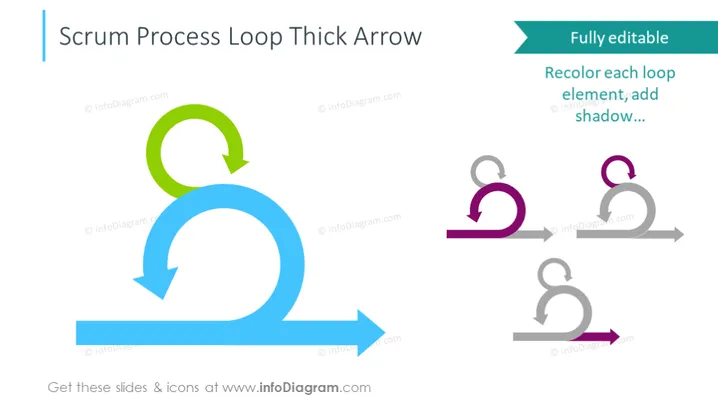
Scrum Process Loop Thick Arrow
Slide Content
The PowerPoint slide titled "Scrum Process Loop Thick Arrow" illustrates the cyclical nature of the Scrum process, a framework within agile methodology. The highlighted graphic represents the iterative process in Scrum, which consists of repetitions of work cycles to develop a product. The slide features a statement about the graphic being fully editable, suggesting viewers can recolor each loop element and add shadow for customization to fit their specific presentation needs.
Graphical Look
- A large blue thick arrow forms a loop, with a small green arrow looping off of the main blue arrow, symbolizing the continuous iterative process of Scrum.
- Three smaller versions of the loop occur in a row on the right in shades of gray and purple, indicating different customizable styles for the loop.
- A prominent turquoise callout box states, "Fully editable" followed by instructions like "Recolor each loop element; add shadow..." emphasizing the customizability of the slide contents.
- The slide has a simple, uncluttered look, primarily using flat design elements without complex textures or patterns.
The overall aesthetic of the slide is modern and clean, utilizing minimalist graphical elements to focus on the concept being presented. The color contrast between the blue and green arrows and the gray background helps direct viewer attention to the iterative process represented.
Use Cases
- Presenting the Scrum framework to teams unfamiliar with agile methodologies.
- Illustrating the continuous improvement aspect during Scrum training sessions.
- Customizing the slide to fit a company's branding during an internal presentation.
- Explaining the iterative development cycle during a project management workshop.
How to Edit
How to edit text & colors

How to expand / shorten diagram

How to Replace Icons in infoDiagram PPT


