
Reviews
Ihre Grafiken verleihen meinen Präsentationen eine nette Note, und ich habe sie kürzlich für eines meiner All-Hands-Meetings verwendet. Ihre Toolbox verleiht meinen Folien Professionalität, anstatt Standard-Clipart zu verwenden.
Ich brauchte einen neuen Blick auf einige meiner Folien. Ich habe versucht, einen Weg zu finden, einen Pinselschlag-Effekt zu erzielen, um zu unterstreichen, hervorzuheben, Farbe hinzuzufügen, und die handgeschriebenen Markierungen waren genau das Richtige. Sehr einfach zu bedienen, leicht in der Größe zu ändern, die Farbe zu ändern. Es war eine erschwingliche, perfekte Lösung und ich empfehle sie gerne weiter.
Die klare, saubere Optik der Grafiken und die Tatsache, dass ich die Farben leicht bearbeiten und an die Vorlage anpassen konnte, war mein Hauptgrund für den Kauf.
Description
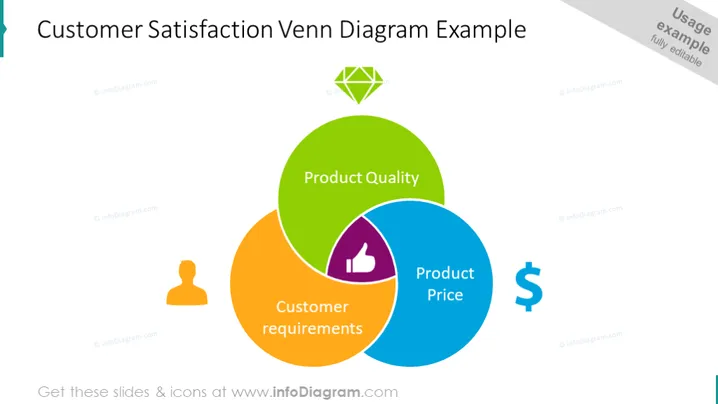
Customer Satisfaction Venn Diagram Example
Slide Content
This PowerPoint slide presents a Venn diagram illustrating the concept of customer satisfaction, focusing on three interrelated components: Product Quality, Product Price, and Customer Requirements. Product Quality refers to how well a product meets customer expectations in terms of functionality, durability, and performance. Product Price indicates the cost of the product in relation to its perceived value to the customer. Customer Requirements are the specific needs or wants that customers expect the product to fulfill. The overlapping areas of the circles may suggest areas of strategic focus to maximize customer satisfaction.
Graphical Look
- The slide's title "Customer Satisfaction Venn Diagram Example" is prominent at the top of the slide in large, dark text.
- A large Venn diagram dominates the slide, composed of three overlapping circles in different colors representing different elements of customer satisfaction.
- The green circle is labeled "Product Quality."
- The blue circle is labeled "Product Price."
- The orange circle is labeled "Customer Requirements."
- Icons are associated with each circle:
- A green diamond icon with a checkmark represents Product Quality.
- A blue thumbs-up icon represents Product Price.
- An orange user icon represents Customer Requirements.
- The background of the slide is white, fading into a light blue at the top right corner.
The overall look of the slide is colorful and visually balanced, with clear, easy-to-understand icons that reinforce the presented concepts.
Use Cases
- Explaining the key factors of customer satisfaction to a marketing team during a strategic planning meeting.
- Presenting a business case to stakeholders on where to focus product development efforts.
- Training new employees on the importance of balancing quality, cost, and customer needs in product design.
- Analyzing customer feedback and using the insights to adjust business strategies for improving customer satisfaction.
How to Edit
How to edit text & colors

How to expand / shorten diagram

How to Replace Icons in infoDiagram PPT


