
Reviews
Sus gráficos añaden un toque agradable a mis presentaciones y recientemente los usé para una de mis reuniones generales. Su conjunto de herramientas añade profesionalismo a mis diapositivas. En lugar de usar imágenes prediseñadas estándar.
Necesitaba un aspecto fresco para algunas de mis diapositivas. Había intentado encontrar una forma de crear un efecto de pincel, de subrayar, acentuar, añadir algo de color y los marcadores escritos a mano fueron justo lo que necesitaba. Muy fácil de usar, fácil de ajustar el tamaño, cambiar el color. Fue una solución asequible y perfecta, y estoy feliz de recomendarla.
El aspecto nítido y limpio de los gráficos, y el hecho de que me permitiera editar y cambiar fácilmente los colores para que coincidieran con la plantilla fue mi principal razón para comprarlos.
Description
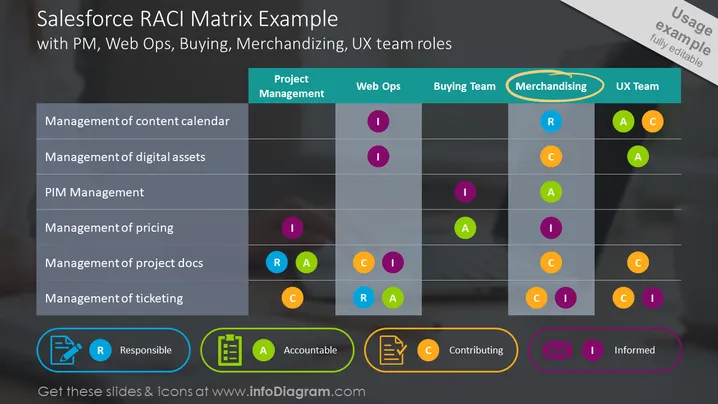
Salesforce RACI Matrix Example with PM, Web Ops, Buying, Merchandising, UX team roles
Slide Content:
The slide shows a RACI matrix designed for a Salesforce project, detailing various tasks like content calendar management and digital asset management, and the roles associated with them. Specific roles include Project Management, Web Ops, Buying Team, Merchandising, and UX Team, each with its designated RACI letters (Responsible, Accountable, Consulted, Informed) in corresponding cells, signifying their level of involvement in each task.
Graphical Look:
- A matrix with rows labeled with tasks and columns labeled with team roles.
- Colored circles with letters 'R', 'A', 'C', and 'I' inside the matrix cells, representing RACI designations.
- An orange ellipse highlighting the 'Merchandising' column header.
- Icons at the bottom: a clipboard for Responsible, a checklist for Accountable, a group for Contributing, and a mail for Informed, each with a colored background circle matching the RACI letters.
- The slide's background is dark, with diagonal stripes creating a subtle pattern.
The overall look of the slide is modern and professional, with a clear emphasis on categorization through the use of color-coded circles and icons to visually separate tasks and responsibilities.
Use Cases:
This slide is typically used in business presentations for project kickoff meetings, team briefings, or workshops focused on assigning and clarifying team roles and responsibilities within a Salesforce project. It helps ensure that everyone understands their specific functions and how they contribute to the project's overall workflow.
How to Edit
How to edit text & colors

How to expand / shorten diagram

How to Replace Icons in infoDiagram PPT


