
Reviews
Sus gráficos añaden un toque agradable a mis presentaciones y recientemente los usé para una de mis reuniones generales. Su conjunto de herramientas añade profesionalismo a mis diapositivas. En lugar de usar imágenes prediseñadas estándar.
Necesitaba un aspecto fresco para algunas de mis diapositivas. Había intentado encontrar una forma de crear un efecto de pincel, de subrayar, acentuar, añadir algo de color y los marcadores escritos a mano fueron justo lo que necesitaba. Muy fácil de usar, fácil de ajustar el tamaño, cambiar el color. Fue una solución asequible y perfecta, y estoy feliz de recomendarla.
El aspecto nítido y limpio de los gráficos, y el hecho de que me permitiera editar y cambiar fácilmente los colores para que coincidieran con la plantilla fue mi principal razón para comprarlos.
Description
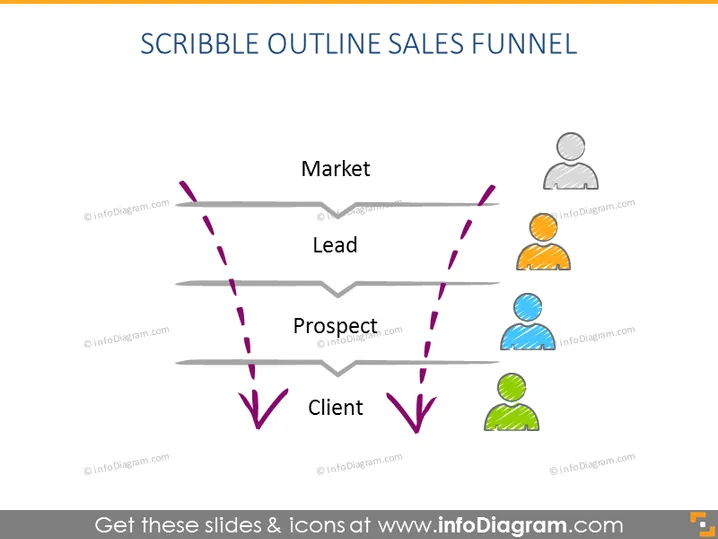
SCRIBBLE OUTLINE SALES FUNNEL
Slide Content
This PowerPoint slide visualizes the sales funnel process with a simple, scribble-style diagram. It maps out the journey from "Market" to "Client" through stages marked as "Lead" and "Prospect." Each stage is linked with purple arrows, indicating progress through the funnel. "Market" refers to the initial pool of potential customers. "Lead" denotes individuals who have shown interest in the product or service. "Prospect" is further narrowed down to those considered potential buyers, and "Client" signifies a successful conversion.
Graphical Look
- The slide title "SCRIBBLE OUTLINE SALES FUNNEL" is at the top in bold, large font.
- Four horizontal grey lines represent different stages of the sales funnel.
- Purple dashed arrows connect these lines, creating a downward path and indicating the flow from one stage to the next.
- Next to each stage, there are colored human silhouettes: gray for "Market," orange for "Lead," blue for "Prospect," and green for "Client."
- The human silhouettes have a scribble-like, sketched design with white space inside the figure, adding to the informal style.
- The arrow before "Market" and after "Client" points outwards, suggesting the entry and exit points of the funnel.
The slide has a clean, minimalist design with a playful, hand-drawn aesthetic achieved through the scribble effect. The color coding of the silhouettes aids in distinguishing between different stages in the sales process.
Use Cases
- To explain the sales process stages in a company presentation or sales strategy meeting
- For training new sales team members about the customer acquisition flow
- In a marketing presentation to show how leads are converted into clients
- As a visual aid during a workshop focused on improving sales funnel efficiency
How to Edit
How to edit text & colors

How to expand / shorten diagram

How to Replace Icons in infoDiagram PPT


