
Reviews
Ihre Grafiken verleihen meinen Präsentationen eine nette Note, und ich habe sie kürzlich für eines meiner All-Hands-Meetings verwendet. Ihre Toolbox verleiht meinen Folien Professionalität, anstatt Standard-Clipart zu verwenden.
Ich brauchte einen neuen Blick auf einige meiner Folien. Ich habe versucht, einen Weg zu finden, einen Pinselschlag-Effekt zu erzielen, um zu unterstreichen, hervorzuheben, Farbe hinzuzufügen, und die handgeschriebenen Markierungen waren genau das Richtige. Sehr einfach zu bedienen, leicht in der Größe zu ändern, die Farbe zu ändern. Es war eine erschwingliche, perfekte Lösung und ich empfehle sie gerne weiter.
Die klare, saubere Optik der Grafiken und die Tatsache, dass ich die Farben leicht bearbeiten und an die Vorlage anpassen konnte, war mein Hauptgrund für den Kauf.
Description
Roundtable Presentation Structure Outlined Agenda
Slide Content
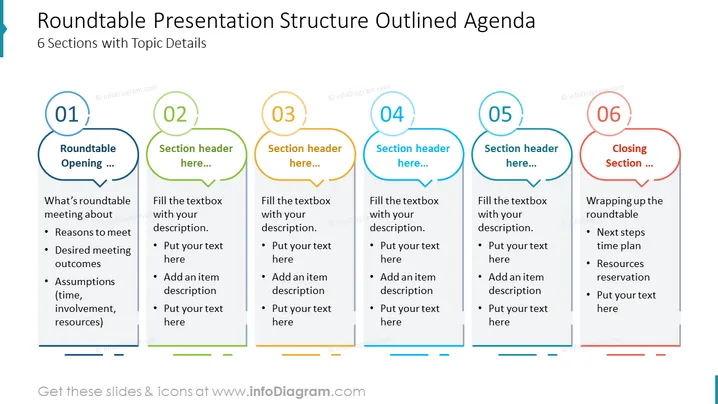
The slide is a template for a "Roundtable Presentation Structure Outlined Agenda" consisting of 6 sections with topic details. The first section is labeled "Roundtable Opening," suggesting points about the purpose of the roundtable, with sub-points including meeting reasons, desired outcomes, and assumptions like time, involvement, and resources. Subsequent sections 2 through 5 are placeholders for other topics, with prompts to add text and items. The final section, "Closing Section," prompts the presenter to address next steps and resource reservation.
Graphical Look
- The slide background is white with a slight gradient at the top, enhancing readability.
- Six numbered sections are represented as capsules, each with a unique color.
- Each section has a title area, which suggests adding a header, followed by a text area below with bullet points.
- Arrows between sections provide a visual flow from one topic to the next.
- The color palette includes blue, green, yellow, and red tones, with the first and last sections emphasized by darker shades.
- The text is black, providing a high contrast against the colored backgrounds.
- Due to no visible footer on the provided image, the footer details are omitted.
The overall look of the slide is clean and organized, utilizing vibrant colors to differentiate between sections. The design is intuitive, guiding the presenter through the agenda with clearly delineated areas for topic content and progression.
Use Cases
- To structure an agenda for a roundtable meeting, guiding participants through each planned topic.
- For educational workshops that involve group discussion, providing a clear outline of the session's flow.
- In corporate presentations where a team's input is needed on a series of topics or projects.
- During conference sessions that involve multi-speaker participation, offering a template for the agenda and discussion areas.
How to Edit
How to edit text & colors

How to expand / shorten diagram

How to Replace Icons in infoDiagram PPT


