
Reviews
Your graphics add a nice touch to my presentations and I recently used them for one of my all-hands meetings. Your toolbox adds professionalism to my slides. Instead of using standard clipart.
I needed a fresh look at some of my slides. I've tried to find a way to create a paintbrush effect, to underline, accentuate, add some color and the handwritten markers were just the things. Very easy to use, easy to size, change the color. It was an affordable, perfect solution and I'm happy to recommend it.
The crisp, clean look of the graphics, and the fact that it allowed me to easily edit and change the colors to match the template was my main reason for purchasing them.
Description
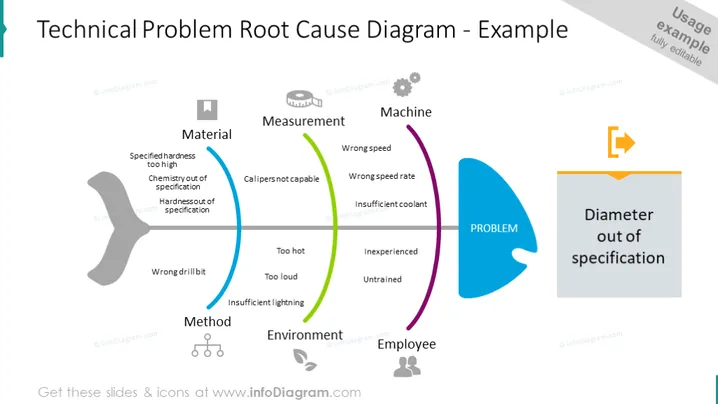
Technical Problem Root Cause Chart slide content
Present your technical problem's root cause with a fishbone diagram for better visualization. Explain the most important problems along with their causes.
- Material – specified hardness too high, chemistry out of specification, hardness out of specification
- Method – wrong drill bit
- Measurement – calipers not capable
- Environment – too hot, loud, or insufficient lighting
- Machine – wrong speed, wrong speed rate, insufficient coolant
- Employee – inexperienced, or untrained We have added representative icons next to each of the elements for an immediate understanding of the topic. All the graphics are editable, so you can customize the presentation as you find suitable, while keeping the quality of the shapes. Video editing instructions are included in the how-to edit section. Click on the picture to see more fishbone diagram slide ideas.
Technical Problem Root Cause Chart slide infographics
Fishbone Vector, Text Box, Flat Style Outline Icons, Measuring Tape Icon, Gear Icon, Staff Icon, Environment Icon, Output Icon
How to Edit
How to edit text & colors

How to expand / shorten diagram

How to Replace Icons in infoDiagram PPT


