
Reviews
Your slides are my "secret sauce" when it comes to presenting my ideas to clients. I save a lot of time.
J'avais un délai de livraison à respecter et je n'avais pas le temps de créer une variété de modèles de diapositives. Infodiagram m'a proposé des options faciles à télécharger et à personnaliser en fonction de mes besoins !
Vos diapositives suscitent souvent de précieux commentaires et idées de la part de mon équipe, ce qui améliore les diapositives finales.
Description
Roll-up - OLAP Operation Explanation Template
Slide Content
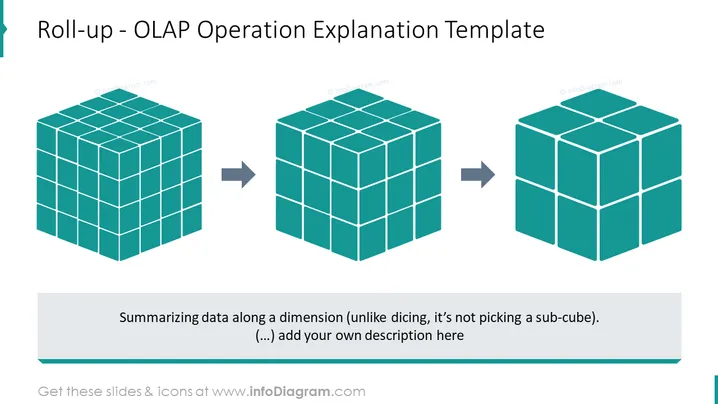
The slide is designed to explain the 'Roll-up' operation in Online Analytical Processing (OLAP). It visually represents the concept of data summarization across a dimension, which is a key aspect of OLAP systems. The slide suggests that unlike 'dicing', which selects sub-cubes of data, 'roll-up' aggregates data across a dimension, providing a more summarized view. It encourages the presenter to add their own description, indicating that it's a template for customization.
Graphical Look
- Three-dimensional cubes in teal color represent data structures in an OLAP system.
- Arrows pointing from left to right between the cubes imply a transformation or process.
- A text box below the cubes includes a brief explanation of the roll-up process and a prompt to add additional content.
- The slide background is plain and white, drawing focus to the cubes and the explanatory text.
The graphic design utilizes simplicity and clean lines to effectively convey the process of data aggregation in OLAP without unnecessary distractions. The slide’s minimalist aesthetic emphasizes the transition from detailed to aggregated data using cubes and directional arrows.
Use Cases
- Presenting the functionalities of OLAP tools in a business intelligence workshop.
- Illustrating data processing techniques during a data analysis or data warehousing training session.
- Explaining the concept of data roll-up to stakeholders in a meeting discussing database design or reporting strategies.
- Providing a visual aid for academic lectures on data management and multidimensional data models.
How to Edit
How to edit text & colors

How to expand / shorten diagram

How to Replace Icons in infoDiagram PPT


