
Reviews
Sus gráficos añaden un toque agradable a mis presentaciones y recientemente los usé para una de mis reuniones generales. Su conjunto de herramientas añade profesionalismo a mis diapositivas. En lugar de usar imágenes prediseñadas estándar.
Necesitaba un aspecto fresco para algunas de mis diapositivas. Había intentado encontrar una forma de crear un efecto de pincel, de subrayar, acentuar, añadir algo de color y los marcadores escritos a mano fueron justo lo que necesitaba. Muy fácil de usar, fácil de ajustar el tamaño, cambiar el color. Fue una solución asequible y perfecta, y estoy feliz de recomendarla.
El aspecto nítido y limpio de los gráficos, y el hecho de que me permitiera editar y cambiar fácilmente los colores para que coincidieran con la plantilla fue mi principal razón para comprarlos.
Description
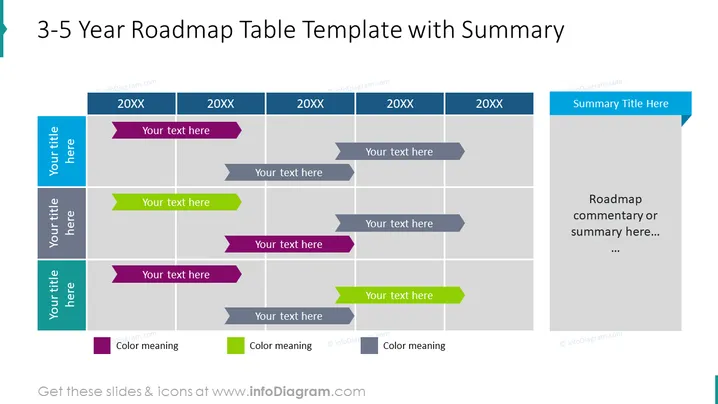
3-5 Year Roadmap Table Template with Summary
Slide Content
The slide is designed to showcase a strategic plan covering a 3-5 year period, utilizing a table format to delineate years and provide a visual progression of goals or milestones. Colorful arrows indicate the flow or progression of items across the timeline, and a summary section provides space for overarching notes or insights. Different colors can represent distinct categories or priority levels, helping to communicate the status or type of initiatives at a glance.
Graphical Look
- Background: Light grey with white gridlines creating a table-like structure.
- Header: A dark blue horizontal stripe across the top with white text.
- Timeline: Four columns labeled with placeholder "20XX" to represent different years.
- Rows: Alternating rows in shades of grey and blue, with each row labeled on the left with a placeholder "Your title here."
- Arrows: Colored arrow shapes (purple and green) pointing to the right signify project timelines or milestones, each arrow paired with a grey text box for additional information.
- Summary Area: A vertical column on the far right with a blue header and larger text area beneath for summarizing the roadmap.
The slide is structured and color-coordinated, presenting information systematically through a mix of text boxes and graphic arrows. It's an efficient way to visualize a multi-year plan in a single view.
Use Cases
- Long-term project management presentations to illustrate phases and key milestones.
- Strategic business planning meetings to align team members on multi-year objectives.
- Investor or stakeholder briefings to communicate company direction and anticipated achievements.
- Annual meetings to provide a visual summary of past performance and future plans.
How to Edit
How to edit text & colors

How to expand / shorten diagram

How to Replace Icons in infoDiagram PPT


