
Reviews
Your slides are my "secret sauce" when it comes to presenting my ideas to clients. I save a lot of time.
J'avais un délai de livraison à respecter et je n'avais pas le temps de créer une variété de modèles de diapositives. Infodiagram m'a proposé des options faciles à télécharger et à personnaliser en fonction de mes besoins !
Vos diapositives suscitent souvent de précieux commentaires et idées de la part de mon équipe, ce qui améliore les diapositives finales.
Description
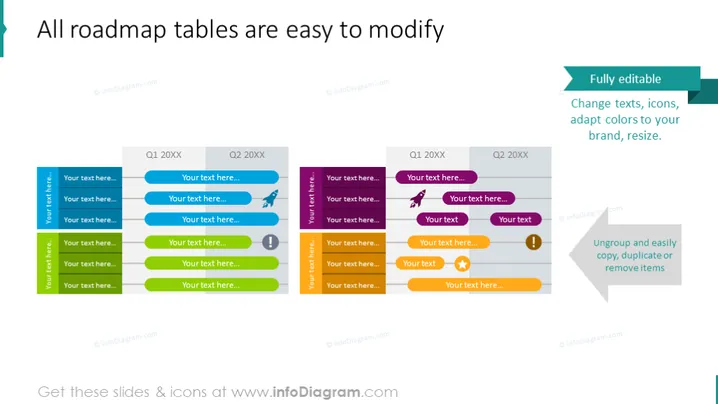
All roadmap tables are easy to modify
Slide Content
The slide presents a colorful roadmap template showing a timeline divided by quarters. Each quarter has a table format with space to detail milestones or events, which make it easy to visualize progress or plans over time. "Fully editable" emphasizes the flexibility of the template, allowing users to change texts, icons, and colors to suit their branding or customize the look. The feature of "Ungroup and easily copy, duplicate or remove items" indicates the user-friendly nature of the slide, enabling personalization and modification to fit various presentation needs.
Graphical Look
- The title of the slide is in a large, bold font that dominates the upper portion of the slide.
- Two main sections are divided by a central vertical line, labeled "Q1 20XX" and "Q2 20XX" respectively.
- Each section contains a table with three columns and various rows in alternating colors.
- The rows are filled with placeholder text "Your text here..." which suggests where the user can add their content.
- Each row has a different color and an icon on the left, indicating different activities or statuses.
- On the right side of the slide, there are two callout boxes with drop shadows. One is teal and states "Fully editable," while the other is gray and includes text about easy ungrouping and item manipulation.
- At the top of each section, there is a label box with a lighter background than the rows that repeats the quarter’s name.
The slide has a clean and modern look with a professional color scheme. It is well-organized, using icons and contrasting colors to differentiate elements and create a visually engaging layout.
Use Cases
- To present project timelines and milestones in a visual format during business meetings.
- For quarterly business reviews to showcase past achievements and future plans.
- In product development presentations to illustrate the phases of releasing new features or updates.
- During strategy sessions to communicate the sequence of key initiatives and their expected completion dates.
How to Edit
How to edit text & colors

How to expand / shorten diagram

How to Replace Icons in infoDiagram PPT


