
Reviews
Sus gráficos añaden un toque agradable a mis presentaciones y recientemente los usé para una de mis reuniones generales. Su conjunto de herramientas añade profesionalismo a mis diapositivas. En lugar de usar imágenes prediseñadas estándar.
Necesitaba un aspecto fresco para algunas de mis diapositivas. Había intentado encontrar una forma de crear un efecto de pincel, de subrayar, acentuar, añadir algo de color y los marcadores escritos a mano fueron justo lo que necesitaba. Muy fácil de usar, fácil de ajustar el tamaño, cambiar el color. Fue una solución asequible y perfecta, y estoy feliz de recomendarla.
El aspecto nítido y limpio de los gráficos, y el hecho de que me permitiera editar y cambiar fácilmente los colores para que coincidieran con la plantilla fue mi principal razón para comprarlos.
Description
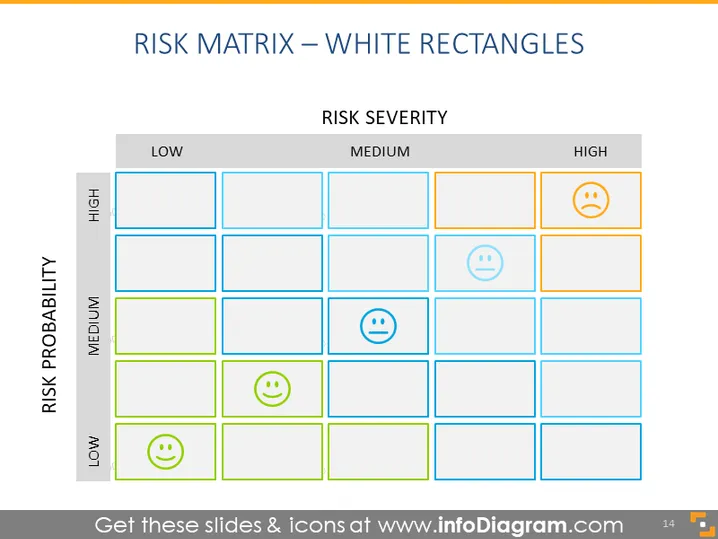
RISK MATRIX – WHITE RECTANGLES
Slide Content
The slide depicts a risk matrix, a tool used to assess various levels of risk based on the severity and probability of occurrences. The matrix is divided into three main columns indicating low, medium, and high risk severity, and three rows showing high, medium, and low likelihood of risks (risk probability). In the high probability and high severity section, there is a sad emoticon, signifying a high-impact risk. The medium sections display neutral emoticons, and the low sections have happy emoticons, indicating manageable risks.
Graphical Look
- The slide background is white.
- The matrix grid consists of 9 rectangular cells, visually separated by bold blue lines.
- Each cell has a white background with a thin outline in different shades of blue and orange, depending on the associated risk level.
- Cells under 'HIGH' risk severity have orange outlines.
- Cells indicating different levels of 'RISK PROBABILITY' have blue outlines, with darker blue for 'HIGH' and lighter blue for 'LOW'.
- There are three emoticon faces used as icons to represent different levels of risk: a happy face for 'LOW,' a neutral face for 'MEDIUM,' and a sad face for 'HIGH.'
- The titles 'RISK SEVERITY' and 'RISK PROBABILITY' are in dark text, aligned with their corresponding matrix columns and rows.
The slide has a clean and professional appearance with a clear color-coded risk assessment system that enhances understanding at a glance.
Use Cases
- For project management presentations to evaluate and discuss potential project risks.
- In business strategy meetings to assess and prioritize risks when planning new ventures or initiatives.
- During corporate risk management workshops to train employees on how to identify and classify risks.
- As part of a decision-making process in financial analysis to understand investment risks and prepare mitigation strategies.
How to Edit
How to edit text & colors

How to expand / shorten diagram

How to Replace Icons in infoDiagram PPT


