
Reviews
Your graphics add a nice touch to my presentations and I recently used them for one of my all-hands meetings. Your toolbox adds professionalism to my slides. Instead of using standard clipart.
I needed a fresh look at some of my slides. I've tried to find a way to create a paintbrush effect, to underline, accentuate, add some color and the handwritten markers were just the things. Very easy to use, easy to size, change the color. It was an affordable, perfect solution and I'm happy to recommend it.
The crisp, clean look of the graphics, and the fact that it allowed me to easily edit and change the colors to match the template was my main reason for purchasing them.
Description
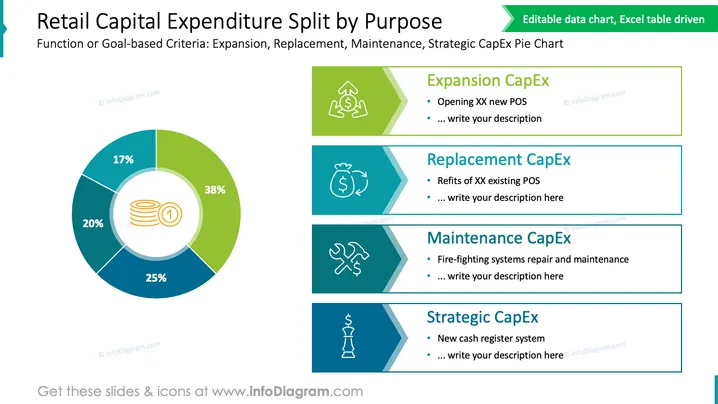
Retail Capital Expenditure Split by Purpose
Slide Content
The slide displays the breakdown of retail capital expenditure (CapEx) based on functional or goal-oriented criteria such as Expansion, Replacement, Maintenance, and Strategic expenditures. Expansion CapEx (38%) is for opening new points of sale (POS), Replacement CapEx (20%) refers to refits of existing POS, Maintenance CapEx (25%) covers repairs and maintenance such as fire-fighting systems, and Strategic CapEx (17%) includes significant investments like a new cash register system.
Graphical Look
- The slide has a large pie chart on the left side, using four different colors to represent different categories of expenditures.
- The central icon within the pie chart is a stack of coins, symbolizing capital expenditure.
- Percentage values are clearly labeled on each segment of the pie chart.
- There are four rectangular colored blocks to the right, each with a distinctive icon representing different types of expenditures.
- The colors of the rectangular blocks correspond to the colors in the pie chart segments for cohesive visual associations.
- Each block contains a placeholder text and provides a brief description or area to write more details.
- The icons within these blocks are a circulating arrow for Expansion, a money bag for Replacement, a wrench for Maintenance, and a trophy for Strategic.
The slide has a clean and professional look, with a well-organized layout that allows for easy interpretation of the data. The use of icons and color coordination aids in visually correlating the text descriptions with the pie chart segments.
Use Cases
- Presenting in a board meeting to discuss and justify budget allocations.
- Reporting in a financial review about how capital is being utilized in a retail business.
- Using in strategy sessions to identify areas of investment and potential cost-saving measures.
- Sharing with stakeholders or investors to provide an overview of capital usage and investment focuses.
How to Edit
How to edit text & colors

How to expand / shorten diagram

How to Replace Icons in infoDiagram PPT


