
Reviews
Sus gráficos añaden un toque agradable a mis presentaciones y recientemente los usé para una de mis reuniones generales. Su conjunto de herramientas añade profesionalismo a mis diapositivas. En lugar de usar imágenes prediseñadas estándar.
Necesitaba un aspecto fresco para algunas de mis diapositivas. Había intentado encontrar una forma de crear un efecto de pincel, de subrayar, acentuar, añadir algo de color y los marcadores escritos a mano fueron justo lo que necesitaba. Muy fácil de usar, fácil de ajustar el tamaño, cambiar el color. Fue una solución asequible y perfecta, y estoy feliz de recomendarla.
El aspecto nítido y limpio de los gráficos, y el hecho de que me permitiera editar y cambiar fácilmente los colores para que coincidieran con la plantilla fue mi principal razón para comprarlos.
Description
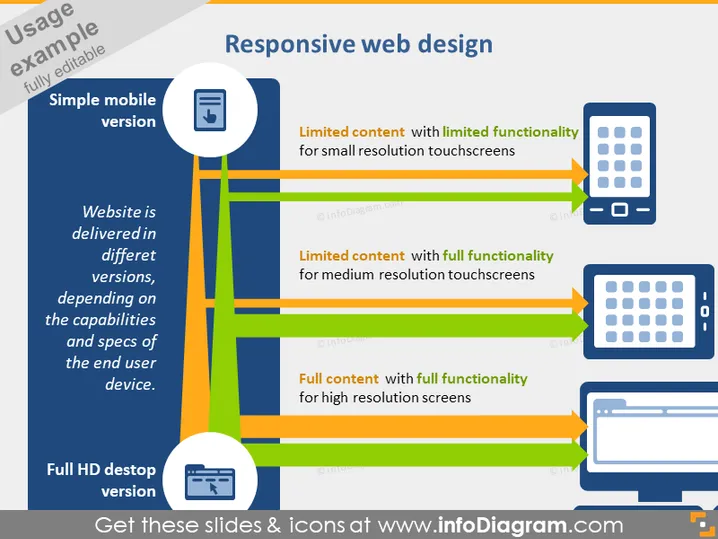
Responsive web design
Slide Content
The slide titled "Responsive web design" explains the concept of delivering a website in different versions optimized for various devices. It highlights three types of device adaptation: a "Simple mobile version" with limited content and functionality for small resolution touchscreens, a medium resolution version offering limited content but full functionality, and a "Full HD desktop version" that provides full content with full functionality for high-resolution screens. Each version is designed to cater to the specific capabilities and specifications of the end user's device.
Graphical Look
- The title "Responsive web design" is prominent at the top of the slide in large, bold text.
- A central vertical line connects three horizontal bars, each leading to a different representation of a web interface.
- The left side of the slide details levels of device adaptation with labeled circles: "Simple mobile version" and "Full HD desktop version".
- Accompanying text explains the adaptation, situated next to each circle.
- On the right side, graphical icons represent different devices: a smartphone, a tablet, and a desktop monitor.
- Each device icon is linked to a description: "Limited content with limited functionality," "Limited content with full functionality," and "Full content with full functionality."
- Colors are used to visually distinguish the three levels: blue for the mobile version, green for medium resolution, and orange for the full HD version.
The overall look of the slide is clean and modern, with a clear visual hierarchy that guides the viewer through the content. The color-coded elements and device icons effectively communicate the concept of responsive web design.
Use Cases
- Presenting the principles of responsive design in a web development or design workshop.
- Explaining website optimization for various devices to clients in a web design pitch.
- Demonstrating the progressive enhancement strategy in a UX/UI design meeting.
- Discussing mobile-first strategies in a marketing presentation focused on reaching mobile users.
How to Edit
How to edit text & colors

How to expand / shorten diagram

How to Replace Icons in infoDiagram PPT


