

Your graphics add a nice touch to my presentations and I recently used them for one of my all-hands meetings. Your toolbox adds professionalism to my slides. Instead of using standard clipart.
Claude Jones, Director of Engineer, @Walmartlabs, USA

Your graphics add a nice touch to my presentations and I recently used them for one of my all-hands meetings. Your toolbox adds professionalism to my slides. Instead of using standard clipart.
Claude Jones, Director of Engineer, @Walmartlabs, USA
I needed a fresh look at some of my slides. I've tried to find a way to create a paintbrush effect, to underline, accentuate, add some color and the handwritten markers were just the things. Very easy to use, easy to size, change the color. It was an affordable, perfect solution and I'm happy to recommend it.
Anonymous, US
The crisp, clean look of the graphics, and the fact that it allowed me to easily edit and change the colors to match the template was my main reason for purchasing them.
Brandie Jenkins, E-learning Developer, USA
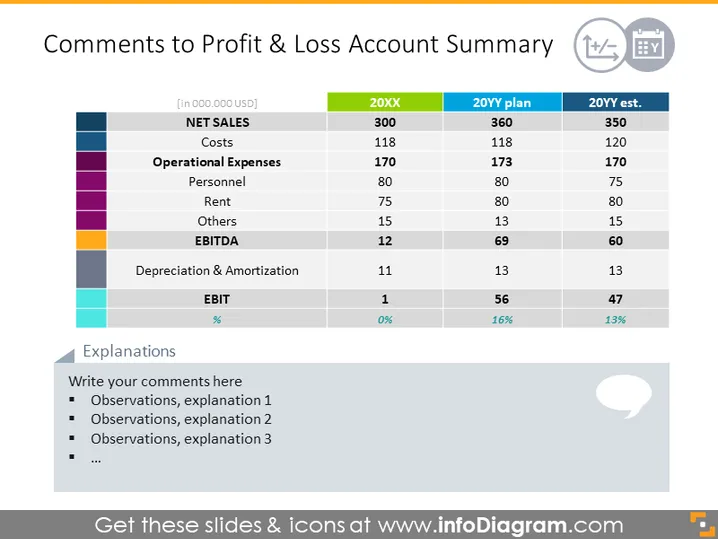
This PowerPoint slide represents a Profit & Loss (P&L) Account Summary with comparative figures for different years. It includes various financial metrics such as Net Sales, Costs, and EBITDA. Specifically, it compares actuals for an unidentified year (20XX) against a plan and an estimate for a future year (20YY). Each financial category breaks down into more detailed items like Personnel and Rent under Operational Expenses. The slide also denotes significant changes with percentages to highlight performance against expectations and includes a section for additional explanatory comments.
The overall look of the slide is clean and professional, with a clear focus on the presentation of financial data. The use of colors and distinct rows enhances readability and allows quick comparisons across different financial terms and fiscal periods.



