
Reviews
Ihre Grafiken verleihen meinen Präsentationen eine nette Note, und ich habe sie kürzlich für eines meiner All-Hands-Meetings verwendet. Ihre Toolbox verleiht meinen Folien Professionalität, anstatt Standard-Clipart zu verwenden.
Ich brauchte einen neuen Blick auf einige meiner Folien. Ich habe versucht, einen Weg zu finden, einen Pinselschlag-Effekt zu erzielen, um zu unterstreichen, hervorzuheben, Farbe hinzuzufügen, und die handgeschriebenen Markierungen waren genau das Richtige. Sehr einfach zu bedienen, leicht in der Größe zu ändern, die Farbe zu ändern. Es war eine erschwingliche, perfekte Lösung und ich empfehle sie gerne weiter.
Die klare, saubere Optik der Grafiken und die Tatsache, dass ich die Farben leicht bearbeiten und an die Vorlage anpassen konnte, war mein Hauptgrund für den Kauf.
Description
PowerPoint presentation of HR Recruitment Process, Selection
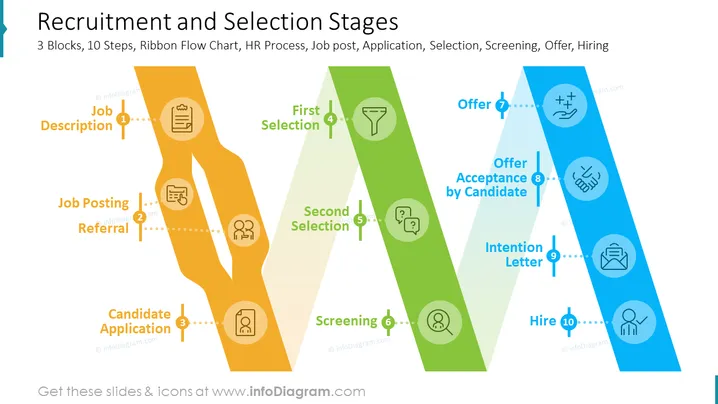
This PowerPoint slide presents an infographic that explains the recruitment and selection stages with examples.
The slide contains a Flow Chart Diagram with descriptions and visual representation HR stages:
- CV Screening
- Assessment
- First Selection
- Candidate Application (CV/resume, motivation letter, video CV, pre-screening questions)
- Job Posting (Company website, job portal, social media, internal website, newspaper, radio)
- Referral (Internal, external)
- Offer
- Job Description
- Intention Letter
- Second Selection (Interview, presentation of candidate, tests & questionnaires, case studies, assessment center, input of direct manager)
- Screening
- Offer
- Acceptance by Candidate
The infographic is divided into three blocks, each representing a different stage of the process. Each block is represented by a different color: orange for the job posting and referral application stages, green for the screening and selection stages, and blue for the offer acceptance and hiring stages.
Each stage is represented by an icon and a brief description, making it easy to understand at a glance. The icons are simple and clear, effectively conveying the meaning of each stage.
The infographic is white in color with a blue border, giving it a clean and professional look. This PPT slide uses infographics to visually represent complex processes, making them easier to understand and remember.
How to Edit
How to edit text & colors

How to expand / shorten diagram

How to Replace Icons in infoDiagram PPT


