
Slide: Recruitment and Selection Process Flowchart

The PowerPoint slide contains those items:

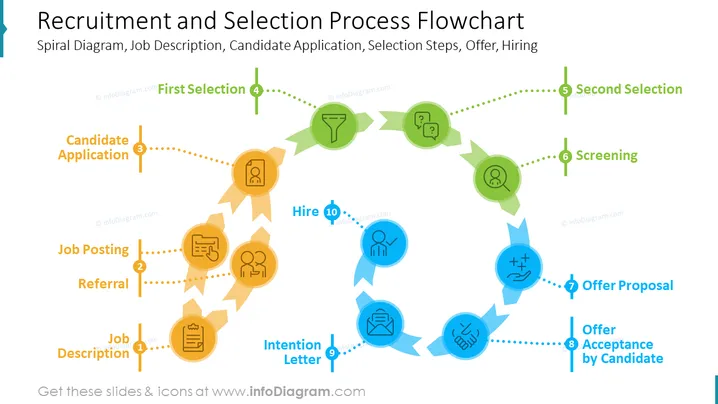
  • Job Posting (Creating and publishing a job description on various platforms to attract candidates.)
  • Candidate Application (Candidates submitting their resumes, cover letters, and other relevant documents.)
  • Screening (Reviewing candidate applications to identify qualified candidates.)
  • First Selection (Conducting initial interviews to select a smaller pool of candidates.)
  • Second Selection (Conducting in-depth interviews and assessments to select the final candidate.)
  • Offer (Extending a job offer to the selected candidate.)
  • Hire (The candidate accepting the job offer and joining the company.)

Graphical Look of the slide

  • The slide has a modern, minimalist design with a white background and black text.

  • The recruitment and selection process flowchart is in the center of the slide and is represented by a spiral diagram with seven steps.

  • Each step of the flowchart is labeled with the corresponding text item from the slide.

  • There is a small icon next to each step of the flowchart to represent the activity involved.

  • There are several icons on the slide, one for each step of the recruitment and selection process flowchart.

  • The icons are:

    • Job posting: A bullhorn icon
    • Candidate application: A resume icon
    • Screening: A magnifying glass icon
    • First selection: A checkmark icon
    • Second selection: A handshake icon
    • Offer: A contract icon
    • Hire: A person icon
Recruitment and Selection Process Flowchart

This slide is part of the deck:

Recruitment, Selection, Hiring HR Processes (PPT Template)


