
Reviews
Sus gráficos añaden un toque agradable a mis presentaciones y recientemente los usé para una de mis reuniones generales. Su conjunto de herramientas añade profesionalismo a mis diapositivas. En lugar de usar imágenes prediseñadas estándar.
Necesitaba un aspecto fresco para algunas de mis diapositivas. Había intentado encontrar una forma de crear un efecto de pincel, de subrayar, acentuar, añadir algo de color y los marcadores escritos a mano fueron justo lo que necesitaba. Muy fácil de usar, fácil de ajustar el tamaño, cambiar el color. Fue una solución asequible y perfecta, y estoy feliz de recomendarla.
El aspecto nítido y limpio de los gráficos, y el hecho de que me permitiera editar y cambiar fácilmente los colores para que coincidieran con la plantilla fue mi principal razón para comprarlos.
Description
Mobiles
Slide Content
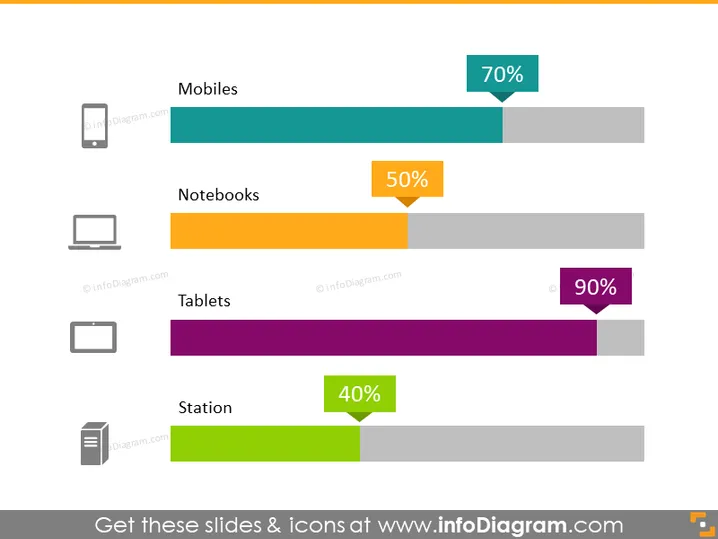
The slide appears to represent a comparison of usage or market penetration statistics for different types of devices. "Mobiles" have a 70% value, suggesting they are quite common or preferred among the categories shown. "Notebooks" are at 50%, indicating a moderate level of use or adoption. "Tablets" have the highest value at 90%, which could mean they are the most used or have the highest market share in this comparison. Lastly, "Station" seems to refer to desktop computers with a 40% value, possibly the least favored or the ones with the lowest market penetration among the listed devices.
Graphical Look
- Four horizontal colored bars each represent a different device category, with varying lengths according to the percentages.
- To the left of each bar, there is a small icon symbolizing the device category: a smartphone, a laptop, a tablet, and a desktop computer.
- To the right of each colored bar, a speech bubble contains the percentage figure for that category.
- The speech bubbles are color-matched to their respective bars, enhancing the visual linkage between the data point and the category.
- The percentage figures within the speech bubbles use a bold, contrasting color for easy readability.
The slide has a simple and clean design that effectively utilizes color and icons to convey information at a glance. The colored bars serve as a visual aid to quickly assess the relative values of each category.
Use Cases
- To present market research data on device usage during a business meeting.
- As part of a marketing strategy presentation to highlight which devices should be targeted for app development or advertising.
- Within an industry report comparing technology adoption rates among different devices.
- To visually represent survey results in an educational or training context regarding technology usage trends.
How to Edit
How to edit text & colors

How to expand / shorten diagram

How to Replace Icons in infoDiagram PPT


