
Reviews
Ihre Grafiken verleihen meinen Präsentationen eine nette Note, und ich habe sie kürzlich für eines meiner All-Hands-Meetings verwendet. Ihre Toolbox verleiht meinen Folien Professionalität, anstatt Standard-Clipart zu verwenden.
Ich brauchte einen neuen Blick auf einige meiner Folien. Ich habe versucht, einen Weg zu finden, einen Pinselschlag-Effekt zu erzielen, um zu unterstreichen, hervorzuheben, Farbe hinzuzufügen, und die handgeschriebenen Markierungen waren genau das Richtige. Sehr einfach zu bedienen, leicht in der Größe zu ändern, die Farbe zu ändern. Es war eine erschwingliche, perfekte Lösung und ich empfehle sie gerne weiter.
Die klare, saubere Optik der Grafiken und die Tatsache, dass ich die Farben leicht bearbeiten und an die Vorlage anpassen konnte, war mein Hauptgrund für den Kauf.
Description
Radar Chart Data-driven Objects
Slide Content
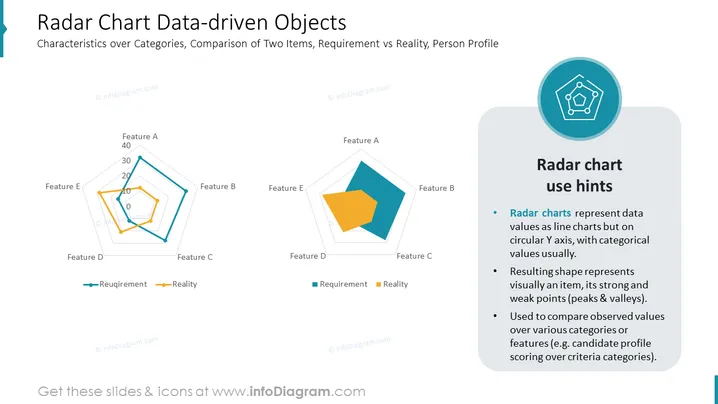
The slide titled "Radar Chart Data-driven Objects" focuses on the utilization of radar charts for showcasing characteristics across categories and comparing two items, such as requirements versus reality, or analyzing a person's profile. On the left, two radar charts depict contrasting data sets labeled 'Requirement' and 'Reality', using different colored lines to distinguish between the expected and actual values of features labeled from A to E. The right side of the slide presents "Radar chart use hints," explaining that radar charts plot data on a circular axis, creating an easily interpretable visual showcasing an item's strengths and weaknesses and are particularly useful for comparing features across various criteria.
Graphical Look
- The slide features a clean, modern design with a predominantly white background.
- The left side of the slide contains two radar charts with blue and orange colored lines representing 'Requirement' and 'Reality', respectively.
- Each radar chart axis has a label for 'Feature A' through 'Feature E' and a numeric scale from 0 to 40.
- On the right, there is a rounded rectangle with a subtle shadow that encapsulates 'Radar chart use hints' and an icon.
- The icon features a stylized radar chart image within a teal circle, positioned above the hints section.
- The hints section uses bullet points to explain the aspects and applications of radar charts.
- The text on the slide utilizes different sizes and bolding to emphasize titles and key terms.
The overall look of the slide is professional and well-organized, with a good balance between visual elements (charts and icon) and informative text, facilitating an easy understanding of the radar chart concept.
Use Cases
- This slide can be used in business presentations to compare performance metrics against set targets or benchmarks.
- It can depict employee skill assessments during HR presentations, contrasting individual competencies with job requirements.
- Useful in marketing strategy meetings to evaluate the positioning of a product or service across multiple attributes - against competitor offerings.
- Ideal for project management updates, where it can show the alignment of current project status with planned deliverables across various dimensions, such as scope, time, cost, and quality.
How to Edit
How to edit text & colors

How to expand / shorten diagram

How to Replace Icons in infoDiagram PPT


