
Reviews
Your graphics add a nice touch to my presentations and I recently used them for one of my all-hands meetings. Your toolbox adds professionalism to my slides. Instead of using standard clipart.
I needed a fresh look at some of my slides. I've tried to find a way to create a paintbrush effect, to underline, accentuate, add some color and the handwritten markers were just the things. Very easy to use, easy to size, change the color. It was an affordable, perfect solution and I'm happy to recommend it.
The crisp, clean look of the graphics, and the fact that it allowed me to easily edit and change the colors to match the template was my main reason for purchasing them.
Description
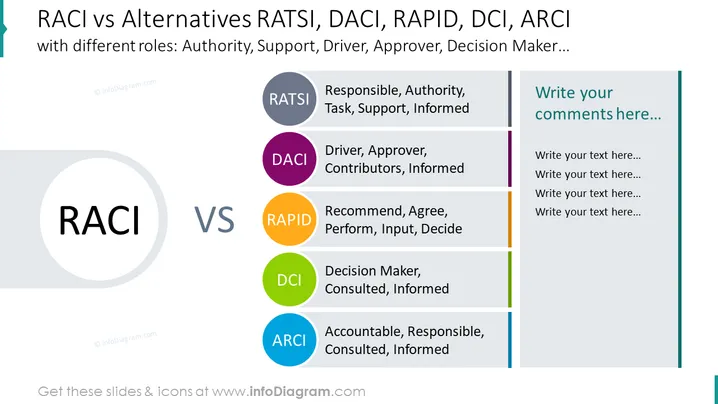
RACI vs Alternatives RATSI, DACI, RAPID, DCI, ARCI
Slide Content:
The slide compares the RACI model with its alternatives, showcasing variations in role definitions for project management and team responsibilities. RATSI stands for Responsible, Authority, Task, Support, Informed; DACI refers to Driver, Approver, Contributors, Informed; RAPID is Recommend, Agree, Perform, Input, Decide; DCI indicates Decision Maker, Consulted, Informed; and ARCI represents Accountable, Responsible, Consulted, Informed. These models provide different frameworks for assigning and clarifying roles in organizational processes.
Graphical Look:
- Five colored bars on the right, each representing an alternative model (RATSI, DACI, RAPID, DCI, ARCI), with corresponding role descriptions.
- A comment section with placeholder text on the far right.
- The colors for each model bar are gray, purple, orange, green, and blue, respectively.
The slide is designed with a clean and business-like aesthetic, using color-coded bars to differentiate between the various models effectively and provide a space for commentary on the right side.
Use Cases:
This slide is suitable for use in project management training, workshops, or team meetings where different role clarification frameworks are being discussed or chosen for implementation. It can help teams decide which model best fits their project or organizational structure.
How to Edit
How to edit text & colors

How to expand / shorten diagram

How to Replace Icons in infoDiagram PPT


