
Reviews
Sus gráficos añaden un toque agradable a mis presentaciones y recientemente los usé para una de mis reuniones generales. Su conjunto de herramientas añade profesionalismo a mis diapositivas. En lugar de usar imágenes prediseñadas estándar.
Necesitaba un aspecto fresco para algunas de mis diapositivas. Había intentado encontrar una forma de crear un efecto de pincel, de subrayar, acentuar, añadir algo de color y los marcadores escritos a mano fueron justo lo que necesitaba. Muy fácil de usar, fácil de ajustar el tamaño, cambiar el color. Fue una solución asequible y perfecta, y estoy feliz de recomendarla.
El aspecto nítido y limpio de los gráficos, y el hecho de que me permitiera editar y cambiar fácilmente los colores para que coincidieran con la plantilla fue mi principal razón para comprarlos.
Description
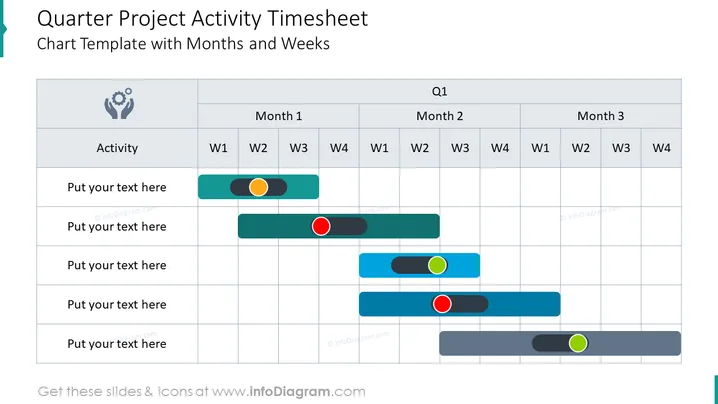
Quarter Project Activity Timesheet Chart Template with Months and Weeks
Slide Content:
This slide is a visual planning tool for tracking project activities on a quarterly basis, broken down by month and week. It features a timesheet layout with rows for different activities and columns representing the weeks within each month. Status indicators, such as colored dots or circles, are placed along the timeline to denote the progress or completion of each task, providing a quick snapshot of project momentum or delays.
Graphical Look:
- A grid layout with columns labeled for each week (W1, W2, W3, W4) under the months of a quarter (Month 1, Month 2, Month 3).
- Horizontal bars in various shades of blue representing the duration of activities across the weeks.
- Colored status indicators (orange, red, green) placed on the bars to mark specific updates or milestones.
- An icon symbolizing teamwork or collaboration in the 'Activity' column header.
The slide's design is functional and methodical, using a muted color palette to maintain focus on the color-coded status indicators.
Use Cases:
This slide is suitable for project management presentations, team meetings, and status updates to monitor progress, deadlines, and task completion. It provides a clear and detailed visual representation of the project's timeline and is particularly useful for collaborative reviews and planning sessions.
How to Edit
How to edit text & colors

How to expand / shorten diagram

How to Replace Icons in infoDiagram PPT


