
Reviews
Your graphics add a nice touch to my presentations and I recently used them for one of my all-hands meetings. Your toolbox adds professionalism to my slides. Instead of using standard clipart.
I needed a fresh look at some of my slides. I've tried to find a way to create a paintbrush effect, to underline, accentuate, add some color and the handwritten markers were just the things. Very easy to use, easy to size, change the color. It was an affordable, perfect solution and I'm happy to recommend it.
The crisp, clean look of the graphics, and the fact that it allowed me to easily edit and change the colors to match the template was my main reason for purchasing them.
Description
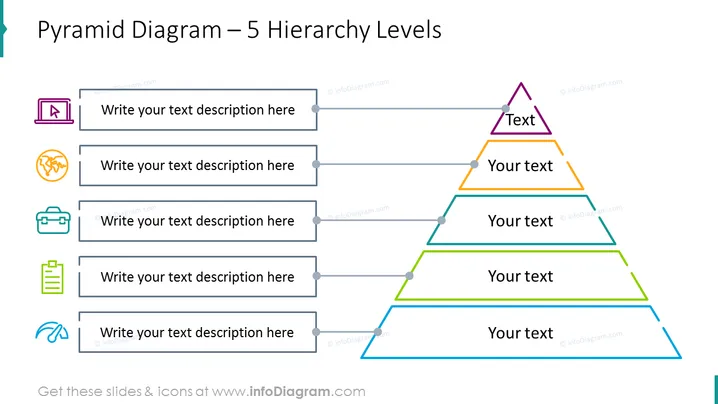
Pyramid Diagram – 5 Hierarchy Levels
Slide Content
The slide illustrates a Pyramid Diagram with 5 hierarchy levels, each represented by a different color and size, indicating a rank or importance from the smallest at the top to the largest at the bottom. Accompanying the pyramid, there is a column on the left side with icons representing different categories or ideas, each with a placeholder text encouraging the presenter to "Write your text description here." This suggests each level of the pyramid should correspond with a specific description adjacent to it.
Graphical Look
- A title at the top in bold blue font.
- A large pyramid divided into five horizontal sections, each a different color: purple, orange, yellow, green, and blue.
- To the left of the pyramid, a vertical stack of five grey text boxes, each paired with a uniquely colored icon aligned left.
- The icons (from top to bottom): a purple chart icon, an orange interlinked circles icon, a green briefcase icon, a yellow document icon, and a blue wave-like symbol.
- Each grey text box has a bullet point connection to the respective pyramid level.
- A clean white background enhances the visibility of the pyramid and text elements.
The slide features a professional layout with well-organized elements, using color-coded sections and icons to visually categorize information. The design allows for easy reading and interpretation of hierarchical relationships or processes.
Use Cases
- Presenting organizational structures showing different levels of management and staff.
- Illustrating step-wise processes or stages in a project, with the hierarchy indicating progression.
- Explaining the breakdown of elements within a system, with each level representing a more detailed component.
- Outlining prioritization for tasks or goals, with the most critical items placed at the top of the pyramid.
How to Edit
How to edit text & colors

How to expand / shorten diagram

How to Replace Icons in infoDiagram PPT


