
Reviews
Your graphics add a nice touch to my presentations and I recently used them for one of my all-hands meetings. Your toolbox adds professionalism to my slides. Instead of using standard clipart.
I needed a fresh look at some of my slides. I've tried to find a way to create a paintbrush effect, to underline, accentuate, add some color and the handwritten markers were just the things. Very easy to use, easy to size, change the color. It was an affordable, perfect solution and I'm happy to recommend it.
The crisp, clean look of the graphics, and the fact that it allowed me to easily edit and change the colors to match the template was my main reason for purchasing them.
Description
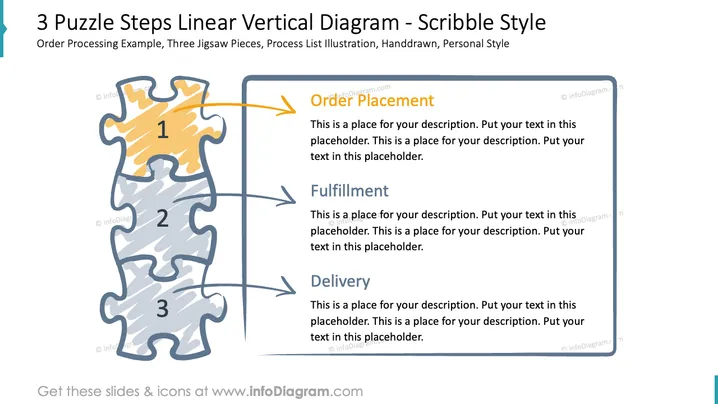
3 Puzzle Steps Linear Vertical Diagram - Scribble Style
Slide Content
The PowerPoint slide illustrates a three-step process depicted as interconnected puzzle pieces, highlighting the stages of 'Order Placement,' 'Fulfillment,' and 'Delivery.' Each step corresponds to a puzzle piece and is accompanied by a text placeholder for a detailed description. "Order Placement" implies the initiation of a service or transaction; "Fulfillment" refers to the process of meeting the service or transaction requirements; "Delivery" signifies the completion stage where the service or product reaches the end-user.
Graphical Look
- The slide uses a vertical stack of three jigsaw puzzle pieces in shades of grey and yellow, numbered 1, 2, and 3, suggesting a sequence.
- Bold, orange-colored arrows point rightward from each puzzle piece, indicating a progression or relationship to adjacent text boxes.
- Text boxes on the right side of the slide contain headings in dark blue and black text captions, allowing for customization of each step's description.
- The puzzle pieces have a scribble texture for a hand-drawn, stylistic appearance.
- The slide background is white and provides a clean contrast to the colors of the slide elements.
- There is a decorative element resembling a light grey vertical bar along the left side of the slide.
The overall look of the slide is both professional and playful, with a hand-drawn aesthetic that adds a personal touch to the presentation. The color choices and diagram style encourage audience engagement while clearly delineating each step of the process.
Use Cases
- To illustrate a step-by-step process during a business meeting or proposal to make complex workflows understandable.
- In training materials where visual cues help to convey the sequence and significance of different stages in a process.
- For project planning presentations that communicate project phases to team members and stakeholders in a visually appealing manner.
- When reporting progress or statuses during periodic updates, using each puzzle piece to represent milestones or completed tasks.
How to Edit
How to edit text & colors

How to expand / shorten diagram

How to Replace Icons in infoDiagram PPT


