
Reviews
Ihre Grafiken verleihen meinen Präsentationen eine nette Note, und ich habe sie kürzlich für eines meiner All-Hands-Meetings verwendet. Ihre Toolbox verleiht meinen Folien Professionalität, anstatt Standard-Clipart zu verwenden.
Ich brauchte einen neuen Blick auf einige meiner Folien. Ich habe versucht, einen Weg zu finden, einen Pinselschlag-Effekt zu erzielen, um zu unterstreichen, hervorzuheben, Farbe hinzuzufügen, und die handgeschriebenen Markierungen waren genau das Richtige. Sehr einfach zu bedienen, leicht in der Größe zu ändern, die Farbe zu ändern. Es war eine erschwingliche, perfekte Lösung und ich empfehle sie gerne weiter.
Die klare, saubere Optik der Grafiken und die Tatsache, dass ich die Farben leicht bearbeiten und an die Vorlage anpassen konnte, war mein Hauptgrund für den Kauf.
Description
Timeline Puzzle Diagram – 7 Jigsaw Pieces
Slide Content
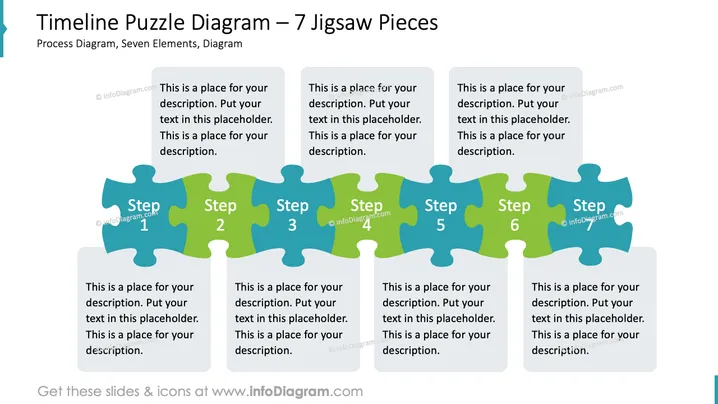
This PowerPoint slide is titled "Timeline Puzzle Diagram – 7 Jigsaw Pieces" and is meant to represent a process diagram with seven interconnected steps. Each jigsaw-shaped piece is labeled with "Step" and a corresponding number from 1 to 7 and includes a placeholder text box for a description. This format visually emphasizes the interconnectedness and sequential nature of the items within a process, project, or timeline by symbolizing them as pieces of a puzzle that fit together.
Graphical Look
- The slide background is white, providing a clean and neutral canvas for the content.
- The main graphic is a horizontal series of jigsaw puzzle pieces, each shaded in alternating colors of green and blue to visually distinguish the steps.
- There are seven puzzle pieces in total, slightly overlapping each other, indicating a flow from left to right.
- Each puzzle piece is labeled with the word "Step" followed by a number from 1 to 7, with the text styled in a bold, sans-serif font.
- Below every puzzle piece, there is a text box with placeholder text in a lighter font, suggesting where to add a description for each step.
- The slide has a large, bold title at the top left corner, using a sans-serif font that matches the font used for the step labels.
- Beneath the title, a subtitle in a smaller font provides additional context: "Process Diagram, Seven Elements, Diagram."
The overall look of the slide is modern and professional, with a simple and clear visual metaphor for a step-by-step process. The color scheme is consistent and limited, making the diagram easy to read and comprehend.
Use Cases
- Presenting the stages of a project timeline in a business strategy meeting, emphasizing their interdependency.
- Illustrating the step-by-step process in a new product development presentation.
- Explaining the sequence of events in an operational improvement plan for a management team.
- Visualizing an organizational change process during a corporate training or workshop session.
How to Edit
How to edit text & colors

How to expand / shorten diagram

How to Replace Icons in infoDiagram PPT


