
Reviews
Your graphics add a nice touch to my presentations and I recently used them for one of my all-hands meetings. Your toolbox adds professionalism to my slides. Instead of using standard clipart.
I needed a fresh look at some of my slides. I've tried to find a way to create a paintbrush effect, to underline, accentuate, add some color and the handwritten markers were just the things. Very easy to use, easy to size, change the color. It was an affordable, perfect solution and I'm happy to recommend it.
The crisp, clean look of the graphics, and the fact that it allowed me to easily edit and change the colors to match the template was my main reason for purchasing them.
Description
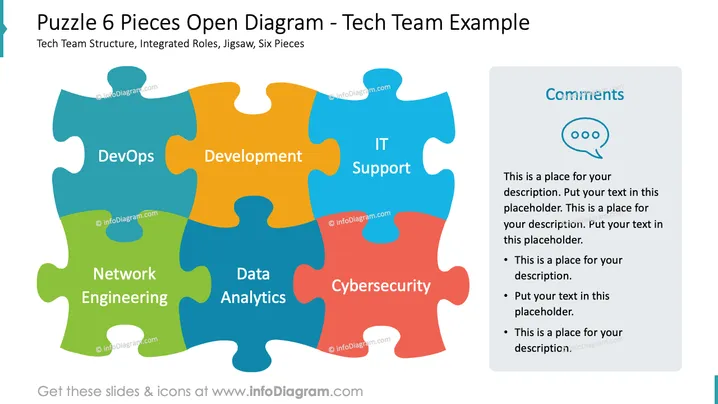
Puzzle 6 Pieces Open Diagram - Tech Team Example
Slide Content
The slide visually represents the structure of a tech team using a six-piece puzzle diagram. Each puzzle piece stands for a different role within the team: "DevOps" ensures continuous integration and deployment facilitating collaboration between development and IT operations; "Development" focuses on the creation of software; "IT Support" maintains the technological infrastructure; "Data Analytics" interprets complex data to inform decisions; "Cybersecurity" safeguards information systems; "Network Engineering" involves the design and optimization of network systems.
Graphical Look
- Six interlocking puzzle pieces in various colors (blue, orange, green, and red), each labeled with a different role of the tech team structure.
- A comment bubble icon at the top right corner of the slide, aligned with a text box for additional comments or description.
- The comment box is designed with a shadow effect, giving it a three-dimensional appearance.
- Textual content within the comment box includes placeholder text and bullet points to guide the presenter on where to add their own notes.
- Ample white space around the puzzle pieces and comment box, creating a balanced and uncluttered visual composition.
The overall look is colorful and engaging, using the familiar concept of a puzzle to represent the interconnected roles within a technology team. The design is professional yet interesting, effectively conveying the message of integration and teamwork.
Use Cases
- Explaining team structure during an internal company meeting to showcase how different departments work together.
- During onboarding sessions for new employees in a tech company to understand their role within the larger team.
- In a sales or consultation presentation to highlight the comprehensive expertise of a tech team to potential clients.
- For project kick-off meetings to provide a clear understanding of each team member's responsibilities and how they fit into the project puzzle.
How to Edit
How to edit text & colors

How to expand / shorten diagram

How to Replace Icons in infoDiagram PPT


