
Reviews
Ihre Grafiken verleihen meinen Präsentationen eine nette Note, und ich habe sie kürzlich für eines meiner All-Hands-Meetings verwendet. Ihre Toolbox verleiht meinen Folien Professionalität, anstatt Standard-Clipart zu verwenden.
Ich brauchte einen neuen Blick auf einige meiner Folien. Ich habe versucht, einen Weg zu finden, einen Pinselschlag-Effekt zu erzielen, um zu unterstreichen, hervorzuheben, Farbe hinzuzufügen, und die handgeschriebenen Markierungen waren genau das Richtige. Sehr einfach zu bedienen, leicht in der Größe zu ändern, die Farbe zu ändern. Es war eine erschwingliche, perfekte Lösung und ich empfehle sie gerne weiter.
Die klare, saubere Optik der Grafiken und die Tatsache, dass ich die Farben leicht bearbeiten und an die Vorlage anpassen konnte, war mein Hauptgrund für den Kauf.
Description
Editable data chart, Excel table
Slide Content
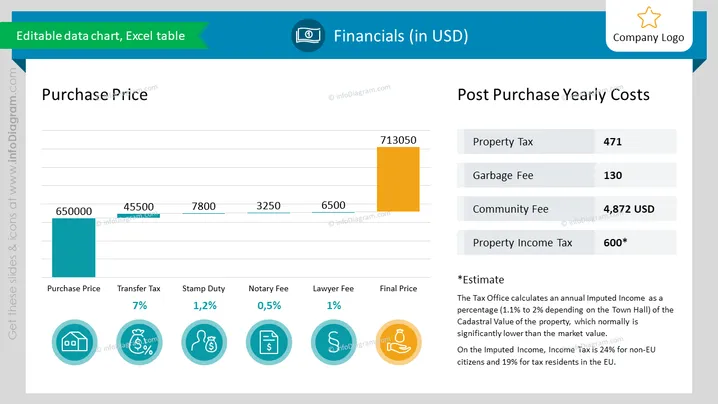
The slide presents financial data related to property acquisition and upkeep costs in USD. The left section of the slide, titled "Purchase Price," shows a bar chart with costs such as Purchase Price, Transfer Tax (7%), Stamp Duty (1.2%), Notary Fee (0.5%), Lawyer Fee (1%), and the Final Price, accompanied by graphical icons representing each cost. The right section, "Post Purchase Yearly Costs," lists ongoing expenses including Property Tax, Garbage Fee, Community Fee, and Property Income Tax, with an asterisk indicating an estimate for the latter.
Graphical Look
- The slide background is white with a subtle grid pattern.
- The top of the slide features a header with a light blue background.
- The slide is divided into two main sections: "Purchase Price" on the left and "Post Purchase Yearly Costs" on the right.
- There is a bar chart in the "Purchase Price" section with bars in teal and orange colors representing different costs.
- Each cost item in the "Purchase Price" section is associated with a circle icon and percentage text.
- The icons are teal with white symbols: a house for Purchase Price, percentage signs for taxes and fees, a notary stamp, and a scale for Lawyer Fee.
- The "Post Purchase Yearly Costs" section has four grey boxes aligned vertically, containing the cost types and corresponding amounts.
- A footnote section at the bottom provides additional information about the "Property Income Tax" estimate.
- Text throughout the slide uses varying fonts and weights for hierarchy, with darker text for headers and lighter texts for details.
The slide has a balanced, professional layout with a clear division between initial costs and ongoing costs. The use of icons helps to visualize the different fees and taxes, making the data more accessible.
Use Cases
- To present a financial breakdown for real estate investments during a business meeting.
- In a real estate company's presentation to clients to illustrate the costs associated with purchasing a property.
- During a financial planning or budgeting session to discuss and analyze property-related expenses.
- For educational purposes, in seminars or classes explaining the financial aspects of buying and maintaining real estate.
How to Edit
How to edit text & colors

How to expand / shorten diagram

How to Replace Icons in infoDiagram PPT


