
Reviews
Sus gráficos añaden un toque agradable a mis presentaciones y recientemente los usé para una de mis reuniones generales. Su conjunto de herramientas añade profesionalismo a mis diapositivas. En lugar de usar imágenes prediseñadas estándar.
Necesitaba un aspecto fresco para algunas de mis diapositivas. Había intentado encontrar una forma de crear un efecto de pincel, de subrayar, acentuar, añadir algo de color y los marcadores escritos a mano fueron justo lo que necesitaba. Muy fácil de usar, fácil de ajustar el tamaño, cambiar el color. Fue una solución asequible y perfecta, y estoy feliz de recomendarla.
El aspecto nítido y limpio de los gráficos, y el hecho de que me permitiera editar y cambiar fácilmente los colores para que coincidieran con la plantilla fue mi principal razón para comprarlos.
Description
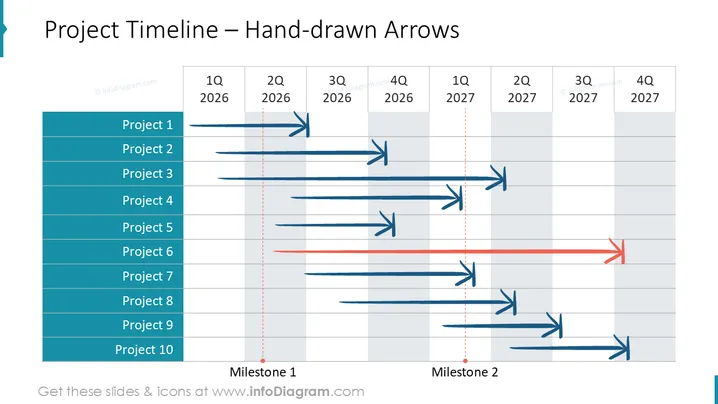
Project Timeline – Hand-drawn Arrows
Slide Content
The slide represents a visual project timeline with hand-drawn arrows indicating the progression and duration of ten different projects. The timeline is divided into quarters (Q1 to Q4) across two years (2025 and 2026). Two milestones are specified within the timeline. Each project is depicted with a unique horizontal arrow spanning various lengths across the quarters, suggesting distinct timeframes for each project's execution. The hand-drawn style of arrows adds a personalized and less formal touch to the timeline.
Graphical Look
- The background of the slide is white with a light gray grid overlay made of horizontal and vertical lines.
- There is a blue vertical banner on the left side listing Project 1 through Project 10 in white text, aligned from top to bottom.
- Horizontal hand-drawn arrow graphics in multiple shades of blue, and a single red arrow span across the grid, representing individual project timelines.
- There are two red dotted vertical lines labeled "Milestone 1" and "Milestone 2," intersecting the horizontal arrows.
- Text labels for quarters and years are placed at the top on a white background (e.g., "1Q 2025," "2Q 2025," etc.).
- The slide has a flat design with minimal use of shadows or 3D effects.
The overall look of the slide is clean and organized, employing a color-coordinated scheme for clarity. The hand-drawn arrows provide a contrast to the structured grid, offering a sense of informality within a formal presentation structure.
Use Cases
- Demonstrating project timelines and progress in management meetings
- Outlining project phases and major checkpoints during client briefings
- Visualizing team workloads and project overlap during resource planning sessions
- Assisting in project review presentations by highlighting completed and ongoing efforts
How to Edit
How to edit text & colors

How to expand / shorten diagram

How to Replace Icons in infoDiagram PPT


