
Reviews
Your slides are my 'secret sauce' when it comes to visualising my ideas to clients. I'm saving so much time.
InfoDiagram has been a wonderful resource since I found the product site a few years ago.
Your slides often generate good comments and ideas from my team that improve the final slides.
Description
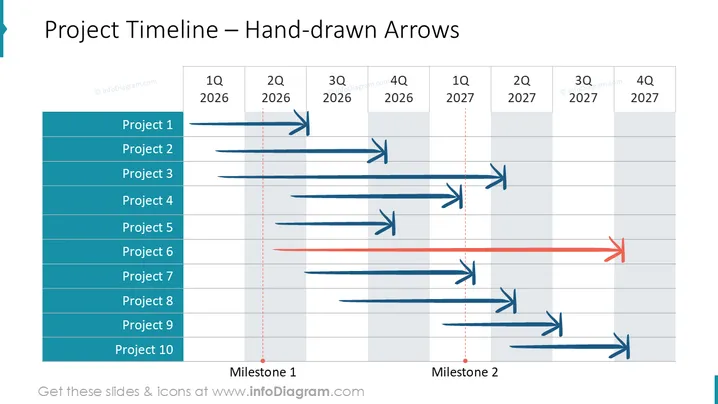
Project Timeline – Hand-drawn Arrows
Slide Content
The slide details a project timeline with hand-drawn arrows indicating different projects spread across quarters of the year 2025 and 2026. Ten projects are listed vertically in a column on the left, each with a corresponding hand-drawn arrow extending towards the right, across a timeline grid marked with quarters. Two milestones are indicated with vertical dashed lines and labeled "Milestone 1" and "Milestone 2". The arrows differ in length, signifying project duration, and some arrows change color or have a red dotted continuation, perhaps signifying a shift in project status or a continuation beyond an initial milestone.
Graphical Look
- The slide title is bold and centered at the top of the slide.
- A vertical list of Project 1 through Project 10 is aligned to the left with blue background.
- Hand-drawn arrows stretch from each project name towards the right, varying in lengths and colors.
- Arrows are primarily blue, with one highlighted in red, suggesting significance.
- Two vertical dashed lines represent milestones, labeled at the bottom.
- A horizontal timeline grid spans the slide, intersecting with the arrows and milestone markers.
- The timeline grid is labeled with "1Q 2025" through "4Q 2026" at the top, divided by quarters.
- Some arrows have a secondary red dotted line continuation, signifying a different phase or extension.
- The slide has a clear, structured layout with a predominantly blue and gray color scheme.
The overall look of the slide is professional, with a clean and organized visual composition. The hand-drawn style of the arrows adds a personalized and informal touch to the data presentation.
Use Cases
- Presenting project schedules and durations to team members or stakeholders during planning meetings.
- Visualizing project progress and anticipated completion phases in management or progress review meetings.
- Highlighting significant milestones and shifts in project timelines during strategy sessions or updates. I'm sorry, but there is no image attached for me to provide information on. Please attach the image, and I'll be happy to help with your request.
How to Edit
How to edit text & colors

How to expand / shorten diagram

How to Replace Icons in infoDiagram PPT


