

Your graphics add a nice touch to my presentations and I recently used them for one of my all-hands meetings. Your toolbox adds professionalism to my slides. Instead of using standard clipart.
Claude Jones, Director of Engineer, @Walmartlabs, USA

Your graphics add a nice touch to my presentations and I recently used them for one of my all-hands meetings. Your toolbox adds professionalism to my slides. Instead of using standard clipart.
Claude Jones, Director of Engineer, @Walmartlabs, USA
I needed a fresh look at some of my slides. I've tried to find a way to create a paintbrush effect, to underline, accentuate, add some color and the handwritten markers were just the things. Very easy to use, easy to size, change the color. It was an affordable, perfect solution and I'm happy to recommend it.
Anonymous, US
The crisp, clean look of the graphics, and the fact that it allowed me to easily edit and change the colors to match the template was my main reason for purchasing them.
Brandie Jenkins, E-learning Developer, USA
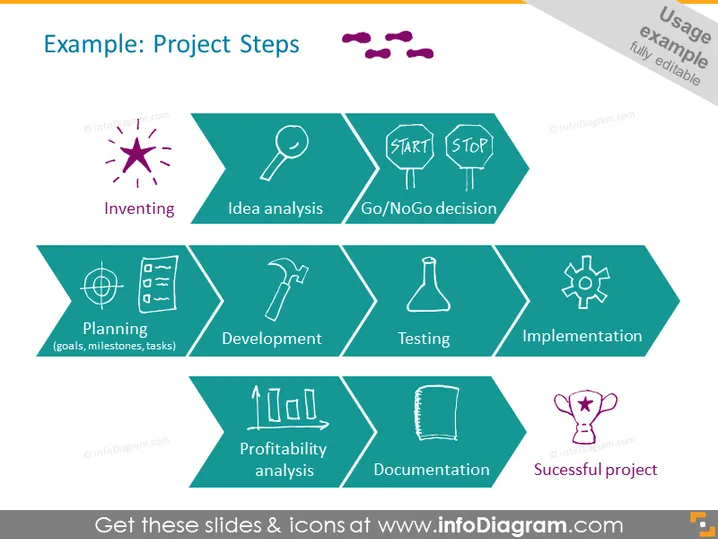
The slide titled "Example: Project Steps" outlines a sequence of steps in a project lifecycle. Starting with "Inventing," where the initial idea is created, followed by "Idea analysis," which involves scrutinizing the idea for its feasibility. The crucial "Go/NoGo decision" step determines whether the project should proceed. "Planning" includes setting goals, milestones, and tasks. "Development" is where the project starts taking shape. "Testing" ensures the project functions correctly, and "Implementation" is the rollout of the completed project. The final steps are "Profitability analysis," which assesses the financial success, "Documentation," which involves recording all pertinent information, and lastly, "Successful project," marking the project's conclusion.
The slide is clean, organized, and visually denotes progress through the use of distinctive geometric shapes. It employs a color theme and consistent iconography to represent a structured process, facilitating easy understanding.



