
Reviews
Ihre Grafiken verleihen meinen Präsentationen eine nette Note, und ich habe sie kürzlich für eines meiner All-Hands-Meetings verwendet. Ihre Toolbox verleiht meinen Folien Professionalität, anstatt Standard-Clipart zu verwenden.
Ich brauchte einen neuen Blick auf einige meiner Folien. Ich habe versucht, einen Weg zu finden, einen Pinselschlag-Effekt zu erzielen, um zu unterstreichen, hervorzuheben, Farbe hinzuzufügen, und die handgeschriebenen Markierungen waren genau das Richtige. Sehr einfach zu bedienen, leicht in der Größe zu ändern, die Farbe zu ändern. Es war eine erschwingliche, perfekte Lösung und ich empfehle sie gerne weiter.
Die klare, saubere Optik der Grafiken und die Tatsache, dass ich die Farben leicht bearbeiten und an die Vorlage anpassen konnte, war mein Hauptgrund für den Kauf.
Description
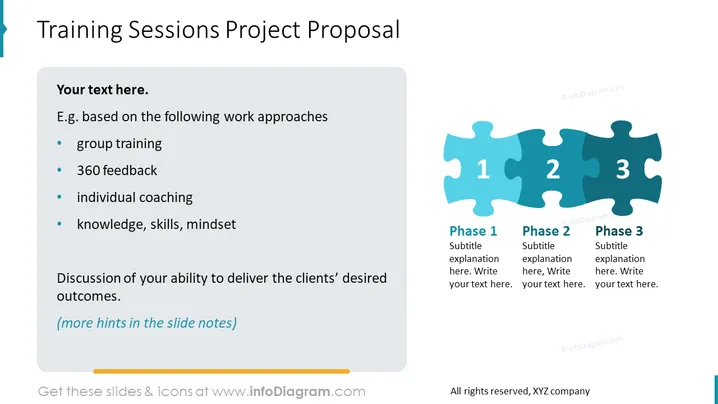
Training Sessions Project Proposal
Slide Content
The slide titled "Training Sessions Project Proposal" is likely a template for presenting a framework for conducting training within an organization. It's broken down into work approaches: group training, 360 feedback, individual coaching, and focusing on knowledge, skills, mindset. This implies that the training sessions are comprehensive and aim to gauge feedback from all sides and address both collective and individual development needs. The bottom text suggests a discussion about the ability to meet client's outcomes, indicating a client-focused approach.
Graphical Look
- The slide background is plain white, providing a clean and uncluttered canvas for the content.
- A large, bold title in dark text is aligned to the left at the top of the slide.
- There is a text box with a light gray background to the left, containing bullet points in dark text.
- Each bullet point is introduced by a blue bullet icon, providing visual coherence and a sense of organization.
- To the right of the text box, there is a series of three interconnected puzzle pieces in shades of blue.
- Each puzzle piece is numbered from 1 to 3 and provides space for text entitled "Phase 1," "Phase 2," and "Phase 3," with an additional line for a subtitle or further explanation.
- The puzzle pieces suggest a step-by-step process or phases of a project and the need for the different elements to fit together to create a whole.
The overall look is professional and organized, with the use of puzzle pieces as metaphors for different phases of a project that, when combined, create a complete picture.
Use Cases
- To present a training program's structure to potential clients or stakeholders within a corporate meeting.
- To provide an overview of a proposed training framework during a sales pitch or consulting presentation.
- To facilitate a workshop where participants are brainstorming the phases of a training initiative.
- For internal discussions with a team or department outlining the proposed stages of employee development and training within a company.
How to Edit
How to edit text & colors

How to expand / shorten diagram

How to Replace Icons in infoDiagram PPT


