
Reviews
Ihre Grafiken verleihen meinen Präsentationen eine nette Note, und ich habe sie kürzlich für eines meiner All-Hands-Meetings verwendet. Ihre Toolbox verleiht meinen Folien Professionalität, anstatt Standard-Clipart zu verwenden.
Ich brauchte einen neuen Blick auf einige meiner Folien. Ich habe versucht, einen Weg zu finden, einen Pinselschlag-Effekt zu erzielen, um zu unterstreichen, hervorzuheben, Farbe hinzuzufügen, und die handgeschriebenen Markierungen waren genau das Richtige. Sehr einfach zu bedienen, leicht in der Größe zu ändern, die Farbe zu ändern. Es war eine erschwingliche, perfekte Lösung und ich empfehle sie gerne weiter.
Die klare, saubere Optik der Grafiken und die Tatsache, dass ich die Farben leicht bearbeiten und an die Vorlage anpassen konnte, war mein Hauptgrund für den Kauf.
Description
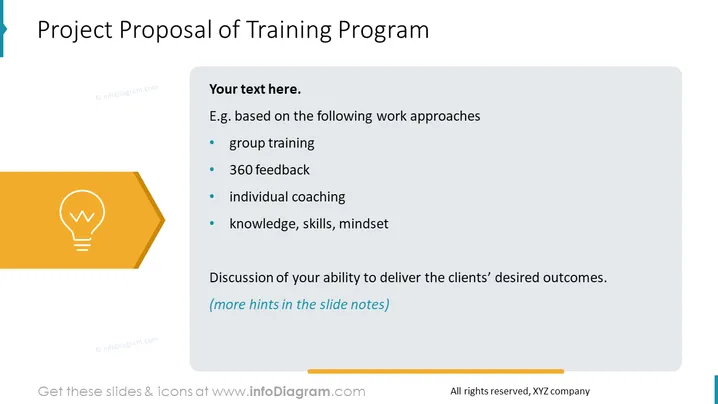
Project Proposal of Training Program
Slide Content
The slide is titled "Project Proposal of Training Program" and contains bullet points suggesting a structure for proposing a training program. The points include 'group training,' which implies training conducted in groups possibly to enhance team cooperation; '360 feedback,' denoting a comprehensive feedback system involving various stakeholders; 'individual coaching,' referring to personalized guidance to improve performance; and 'knowledge, skills, mindset,' suggesting the areas of improvement targeted by the program. There is also a note encouraging discussion on the presenter’s ability to deliver the clients' desired outcomes, with additional hints in the slide notes.
Graphical Look
- The slide has a clean, modern design with a predominantly white background.
- On the left, there's a large, hexagon-shaped icon with a lightbulb pictured inside, symbolizing ideas or inspiration.
- The lightbulb is a flat-design icon with a golden-yellow color, situated against a deep amber background within the hexagon.
- To the right, there is a main text area with a grayish-blue header featuring the title in bold white letters.
- Below the title, there is a smaller, gray subheader that reads "Your text here."
- Underneath, four bullet points are listed in black font with blue bullet markers.
- At the bottom of the slide is a discrete, thin horizontal blue line.
- The overall layout is balanced, with graphical elements aligned to the left and the text content on the right for easy reading.
The slide design is clean and attractive, with a good contrast between the colorful visual elements and the text. The creative use of icons and shapes enhances the visual appeal and assists in conveying the theme of the slide.
Use Cases
- Used in a business meeting to present a new training initiative to management or stakeholders.
- Included in a training and development department presentation to outline proposed methods and objectives for team enhancement.
- Inserted into a proposal for potential clients, detailing the educational strategies a consulting firm offers.
- Employed during company-wide meetings to introduce employees to the upcoming training programs and gather input on the proposed approach.
How to Edit
How to edit text & colors

How to expand / shorten diagram

How to Replace Icons in infoDiagram PPT


