
Reviews
Vos graphiques ajoutent une belle touche à mes présentations et je les ai récemment utilisés pour l'une de mes réunions générales. Votre boîte à outils ajoute du professionnalisme à mes diapositives. Au lieu d'utiliser des cliparts standards.
J'avais besoin d'un nouveau regard sur certaines de mes diapositives. J'ai essayé de trouver un moyen de créer un effet de pinceau, de souligner, d'accentuer, d'ajouter de la couleur et les marqueurs manuscrits étaient exactement ce qu'il fallait. Très facile à utiliser, facile à ajuster la taille, à changer la couleur. C'était une solution abordable et parfaite et je suis heureux de la recommander.
L'aspect net et épuré des graphiques, et le fait qu'il m'ait permis d'éditer et de changer facilement les couleurs pour les adapter au modèle, ont été les principales raisons de mon achat.
Description
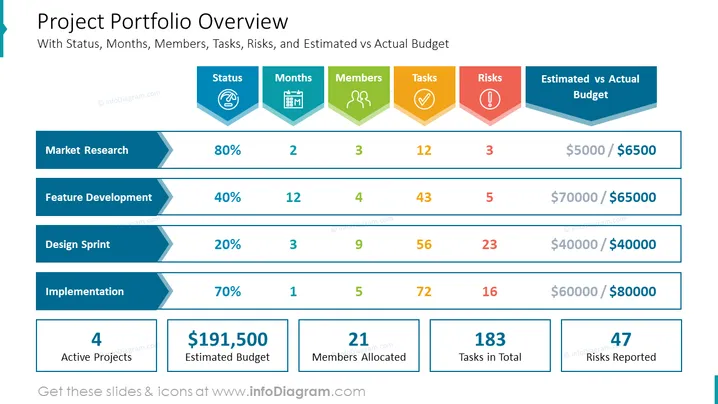
Project Portfolio Overview
Slide Content:
- Status: This column shows the current status of each project, such as "New", "In Progress", or "Completed".
- Months: This column shows the estimated number of months each project will take to complete.
- Members: This column shows the number of people assigned to each project.
- Tasks: This column shows the total number of tasks associated with each project.
- Risks: This column shows the number of risks reported for each project.
- Estimated vs Actual Budget: This column shows the estimated budget for each project compared to the actual budget.
Graphical Look:
- The slide is divided into five columns: Status, Months, Members, Tasks, Risks, and Estimated vs Actual Budget.
- The header of each column is bold and centered.
- The slide also includes a total row at the bottom to show the total number of active projects, estimated budget, members allocated, tasks in total, and risks reported.
The overall visual composition of the slide is clean and professional. The use of a simple color scheme and limited graphical elements makes the slide easy to read and understand.
Use scenarios in business presentations.
A project portfolio overview slide can be used in a variety of business presentations, such as:
- Executive presentations: To give executives a high-level overview of the company's project portfolio, including the status of each project, the number of resources allocated, and any risks that have been identified.
- Portfolio management presentations: To provide portfolio managers with insights into the performance of the project portfolio, including how projects are progressing against their budgets and timelines.
- Project status presentations: To give project stakeholders an update on the status of their project, including the number of tasks completed, the number of risks reported, and any changes to the budget or timeline.
- Resource allocation presentations: To help managers make decisions about how to allocate resources across projects.
- Risk management presentations: To identify and assess risks associated with the project portfolio, and to develop mitigation strategies.
How to Edit
How to edit text & colors

How to expand / shorten diagram

How to Replace Icons in infoDiagram PPT


