

Your graphics add a nice touch to my presentations and I recently used them for one of my all-hands meetings. Your toolbox adds professionalism to my slides. Instead of using standard clipart.
Claude Jones, Director of Engineer, @Walmartlabs, USA

Your graphics add a nice touch to my presentations and I recently used them for one of my all-hands meetings. Your toolbox adds professionalism to my slides. Instead of using standard clipart.
Claude Jones, Director of Engineer, @Walmartlabs, USA
I needed a fresh look at some of my slides. I've tried to find a way to create a paintbrush effect, to underline, accentuate, add some color and the handwritten markers were just the things. Very easy to use, easy to size, change the color. It was an affordable, perfect solution and I'm happy to recommend it.
Anonymous, US
The crisp, clean look of the graphics, and the fact that it allowed me to easily edit and change the colors to match the template was my main reason for purchasing them.
Brandie Jenkins, E-learning Developer, USA
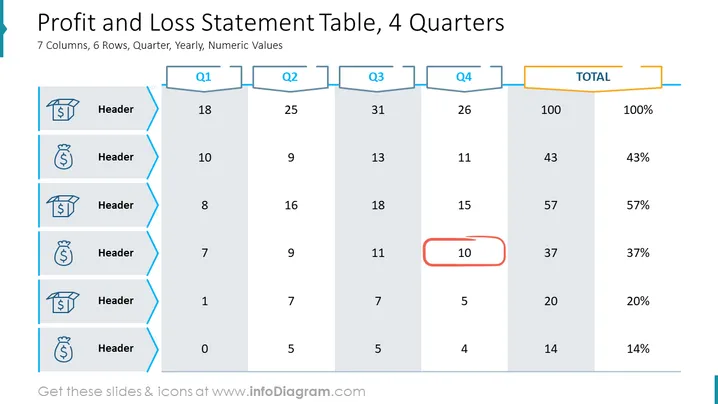
##Slide contents: The Profit and Loss Statement Template can be used to show the company's revenue and expenses. It is similar to an income statement where you can show total profit and loss, but it is more creative and professional especially if you want to present in front of your colleagues. Every company should keep track of its financial statements, especially small business owners to know the financial health of their company. Using the information from the number of goods sold and net sales, you can calculate the net profit. This template will help you manage the operating expenses and gross profit. The table is divided into 7 columns and 6 rows. You can use this Profit and Loss Template if you are an accountant and want to give a financial overview of the whole year to your company's investors. You can download this template in other formats, like Google Slides and Keynote. ##Slide Infographic Description: White Background, Table Chart, Arrow Icon, Product Icon, Box Icon, Open Box Icon, Finance Icon, Dollar Icon



