
Reviews
Ihre Grafiken verleihen meinen Präsentationen eine nette Note, und ich habe sie kürzlich für eines meiner All-Hands-Meetings verwendet. Ihre Toolbox verleiht meinen Folien Professionalität, anstatt Standard-Clipart zu verwenden.
Ich brauchte einen neuen Blick auf einige meiner Folien. Ich habe versucht, einen Weg zu finden, einen Pinselschlag-Effekt zu erzielen, um zu unterstreichen, hervorzuheben, Farbe hinzuzufügen, und die handgeschriebenen Markierungen waren genau das Richtige. Sehr einfach zu bedienen, leicht in der Größe zu ändern, die Farbe zu ändern. Es war eine erschwingliche, perfekte Lösung und ich empfehle sie gerne weiter.
Die klare, saubere Optik der Grafiken und die Tatsache, dass ich die Farben leicht bearbeiten und an die Vorlage anpassen konnte, war mein Hauptgrund für den Kauf.
Description
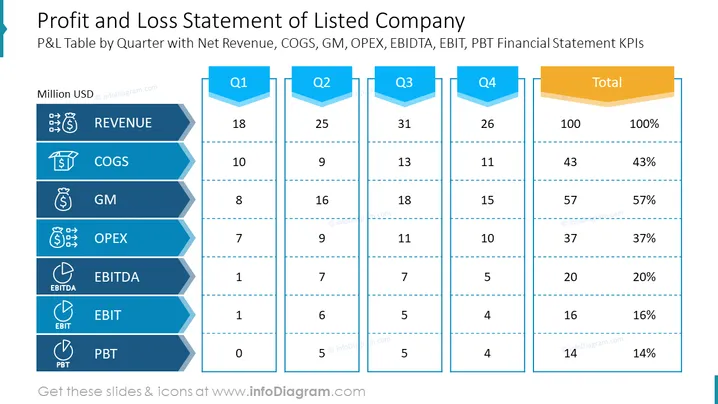
##Profit and Loss Statement of Listed Company
This PowerPoint slide is a comprehensive PPT template for presenting the profit and loss statement of a listed company. It breaks down the company's financials quarterly, showcasing key performance indicators such as net revenue, cost of goods sold (COGS), gross margin (GM), operating expenses (OPEX), EBITDA, EBIT, and profit before tax (PBT). This slide is typically used in financial reporting, quarterly business reviews, and investor presentations to provide a clear overview of financial health.
##What Does This Profit and Loss Statement of Listed Company Include?
- A table with a row for each financial metric, accompanied by relevant icons
- Columns representing four quarters (Q1, Q2, Q3, Q4) and a total column
- Header banners for each column with an arrow design
- Numeric data in each cell representing the values for the respective financial metrics
- Horizontal lines separating the rows for clarity
- A color scheme of different shades of blue for each row, enhancing visual differentiation
##This Profit and Loss Statement of Listed Company is a part of our Listed Company Financial Report Presentation PPT Template.
How to Edit
How to edit text & colors

How to expand / shorten diagram

How to Replace Icons in infoDiagram PPT


